Apple's Live Text reads hand-printed block capitals on a form quite well and reads cursive not at all. That is the short version, and it is why "handwriting OCR" is a different product category from OCR. Tesseract, the free open-source engine most tutorials point at, is worse: on the four samples below it returned no recoverable words from any cursive page.
What does work is a different kind of model, one that reads the page before it reads the letters. Below I run four handwriting samples of increasing difficulty through Apple Vision, Tesseract 5.5.3, and two AI models running locally on an M2 MacBook Air, and print every output exactly as it came out. On the hardest sample one of the two local models quietly rewrites the page instead of failing. That result is in here too.
Why ordinary OCR falls apart on handwriting
Tesseract, Apple Vision and ABBYY are built on the same idea: cut the image into character-sized regions, then match each region against learned glyph shapes. It is a good idea for print, where every letter is separated by design and every "a" is the same "a".
Cursive breaks the first step before the second one gets a chance. There are no character boundaries in joined-up writing. A word is one continuous stroke with rhythmic bumps in it, and where one letter stops and the next begins is a decision, not a fact in the image. An engine that must segment first has to guess, and one bad guess corrupts the whole word.
This is the recurring complaint in r/LocalLLaMA threads on the subject. One person testing engines for a handwriting corpus put it as "Tesseract seems to be the best choice for printed text, but is basically useless for handwritten"; another, working on preprocessing to improve results, concluded "No open-ish model I'm aware of does a sufficiently good job when it comes to OCR on handwriting". Those threads are a year old and the second one has aged; the first has not.
Vision-language models work the other way round. They are trained to look at a whole page image and produce text describing it, so the layout is established first and the words are reconstructed with a language model's sense of what normally follows what. Ambiguous strokes get resolved by context rather than by shape alone, which is exactly what a human paleographer does with an old letter.
The four samples
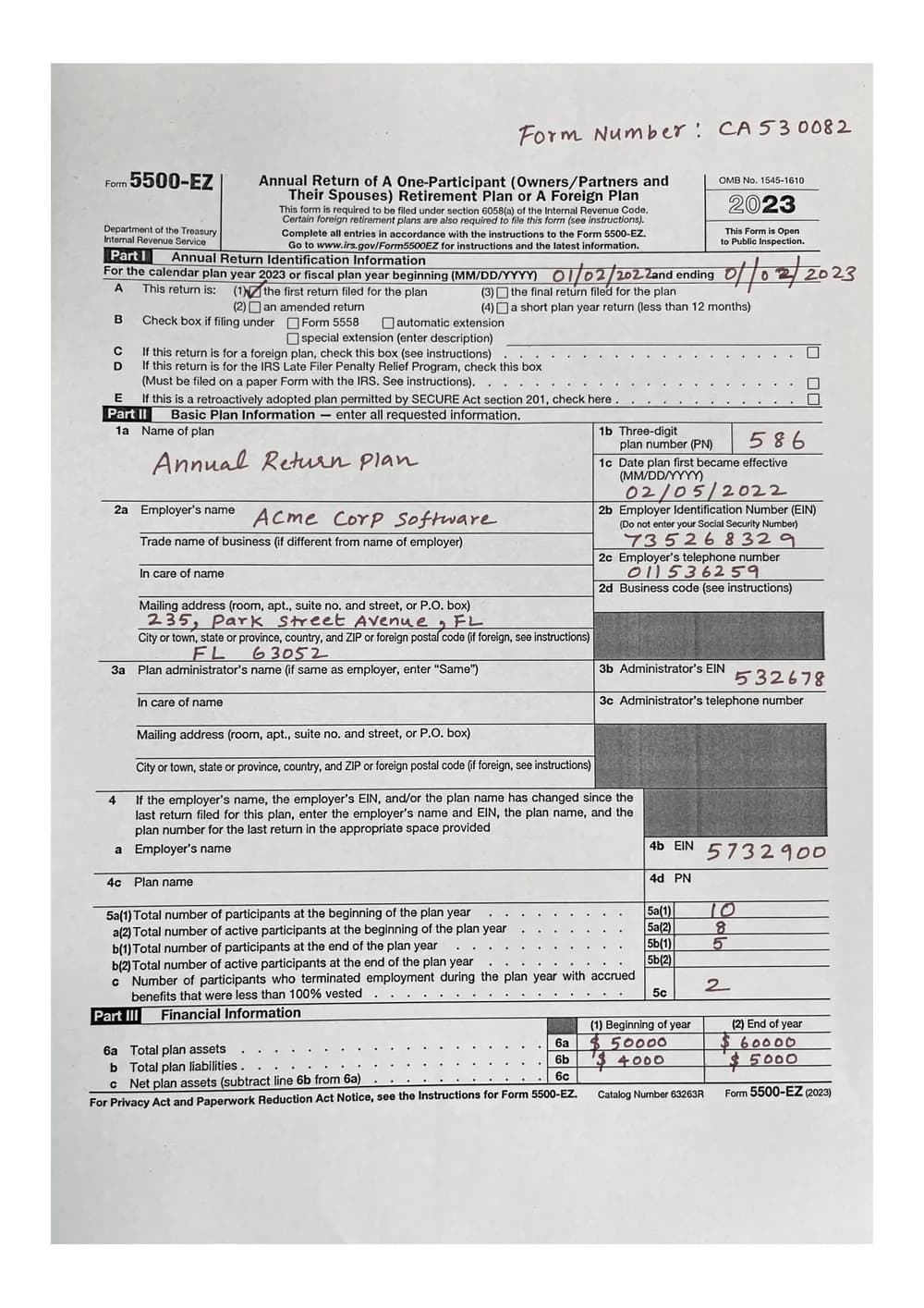
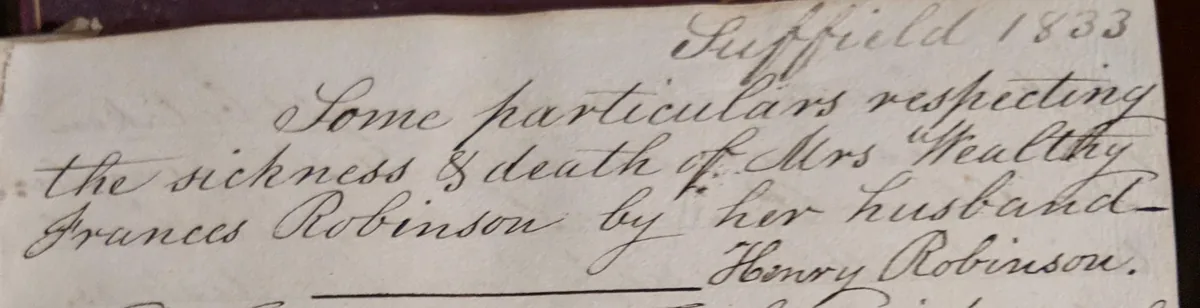
Two sources. The first is a photograph of an IRS Form 5500-EZ filled in by hand with dummy details, from a public OCR test corpus. The rest are crops from one photographed page of a private journal kept in Suffield, Connecticut in 1833, written in copperplate cursive, shot on a phone so it carries page curl and uneven light.
| # | Sample | What makes it hard |
|---|---|---|
| 1 | Hand-filled tax form | Block printing and numerals over dense printed boilerplate |
| 2 | Journal heading | Large, careful cursive with flourishes |
| 3 | Journal body paragraph | Dense running cursive, an interlinear insertion |
| 4 | Full journal page | All of the above, plus page curl, uneven light and the volume of text |
Every AI-model column below is ZenOCR in AI mode, which is the paid tier and is available during the 7-day trial. Apple Vision was run directly through VNRecognizeTextRequest (revision 3, accurate, language correction on), which is the recognizer behind Live Text and behind ZenOCR's free Fast mode.
Sample 1: hand-printed form fields
Form Number: CA530082
01/02/202 Zand ending 0/02
586
Annual Return plan
Acme Corp Software
02/05/2022
735268329
011536259
532678
5732900
Reads most of the handwritten values, the plan number and the effective date included, but returns them as a loose list with nothing attached to its label.
1a Name of plan
Annual Return Plan

1b Three-digit plan number (PN) 586

1c Date plan first became effective
(MM/DD/YYYY)
02/10/2022

2a Employer's name Acme Corp Software

2b Employer Identification Number (EIN)
735268329

3b Administrator's EIN 532678
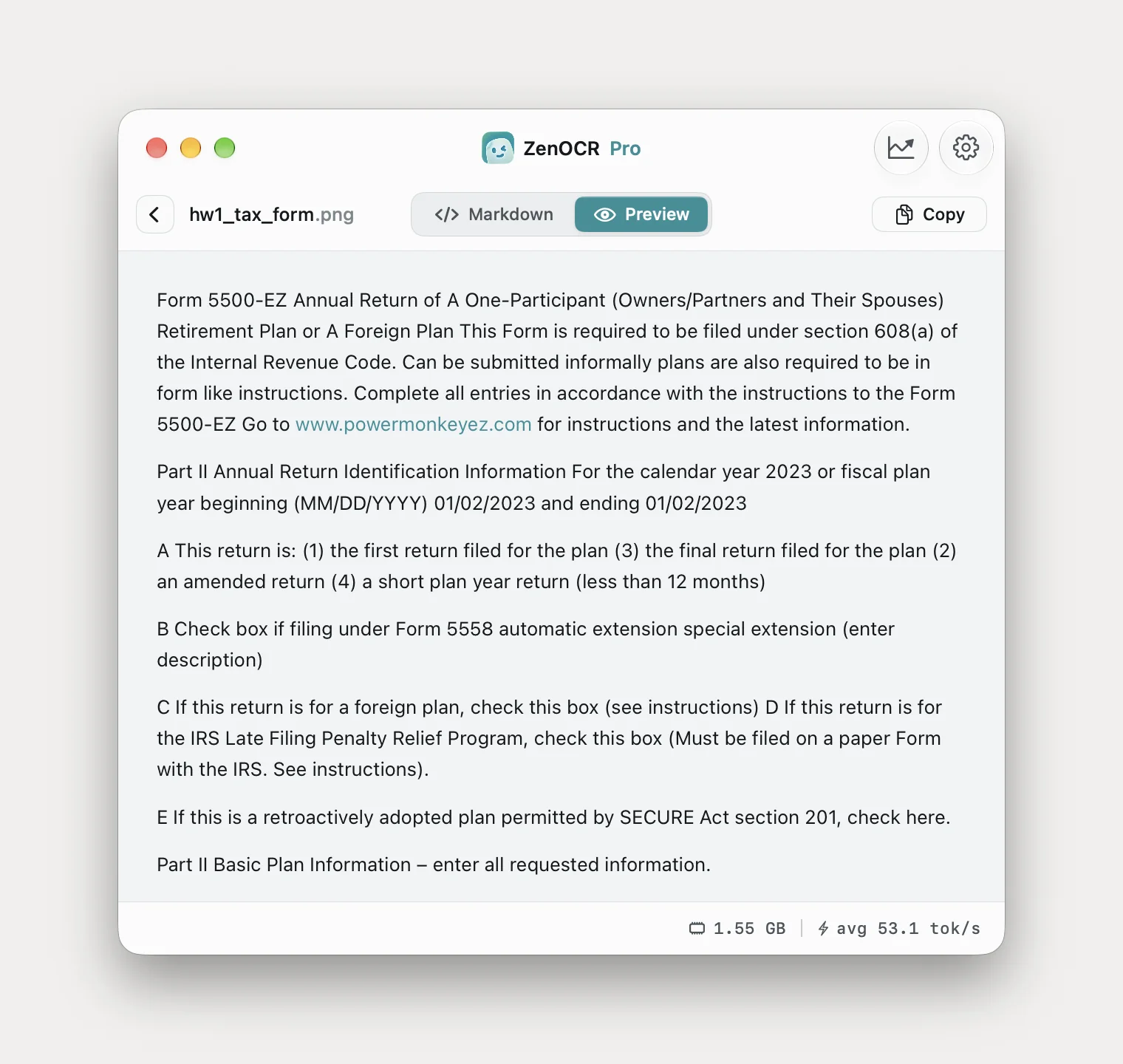
Values attached to their field labels. But 1c should read 02/05/2022, not 02/10/2022.
This is the sample where Live Text is genuinely useful. It recognized the block printing, and it read the numerals accurately. What it did not do is connect any value to the field it belongs to, so you get "532678" with no way to know it is an administrator's EIN, and the plan-year dates arrive fused into "01/02/202 Zand ending 0/02".
GLM-OCR attached every value to its label and then got two dates wrong: 02/10/2022 for 02/05/2022 in field 1c, and 01/02/2023 for the plan-year start of 01/02/2022. Vision, which could not tell you which field it belonged to, read the 1c date itself correctly. On a form, a wrong number that looks confident is worse than a missing one. Check the figures.
Worth noting, because this is where the paid model loses: on the printed boilerplate of this same form, Apple Vision was more accurate. Vision read "section 6058(a) of the Internal Revenue Code" and the URL "www.irs.gov/Form5500EZ" exactly as printed. GLM-OCR rendered the section as "608(a)", turned "Late Filer" into "Late Filing", and replaced the IRS URL with an invented one, "www.powermonkeyez.com", which is the clearest example in this article of a model producing something fluent and entirely false. For clean printed text, Fast mode is not a downgrade.
Samples 2 and 3: cursive
Suppula 1803
tome particulars respiding
The sickness S death of Mrs Health
Frances Robinson by
ay her husband
Henry Robinson.
Place name and date both wrong. Not recoverable.
yA, - fi; gr : f Z 4 a/
tt
4.
Cj Spone. far CLLL APD pebfiecliteg
the wih redd 'Ae athe. of Mrs Goal lleg
a 'L00 oe
Two correct words in the whole block: "the" and "Mrs".
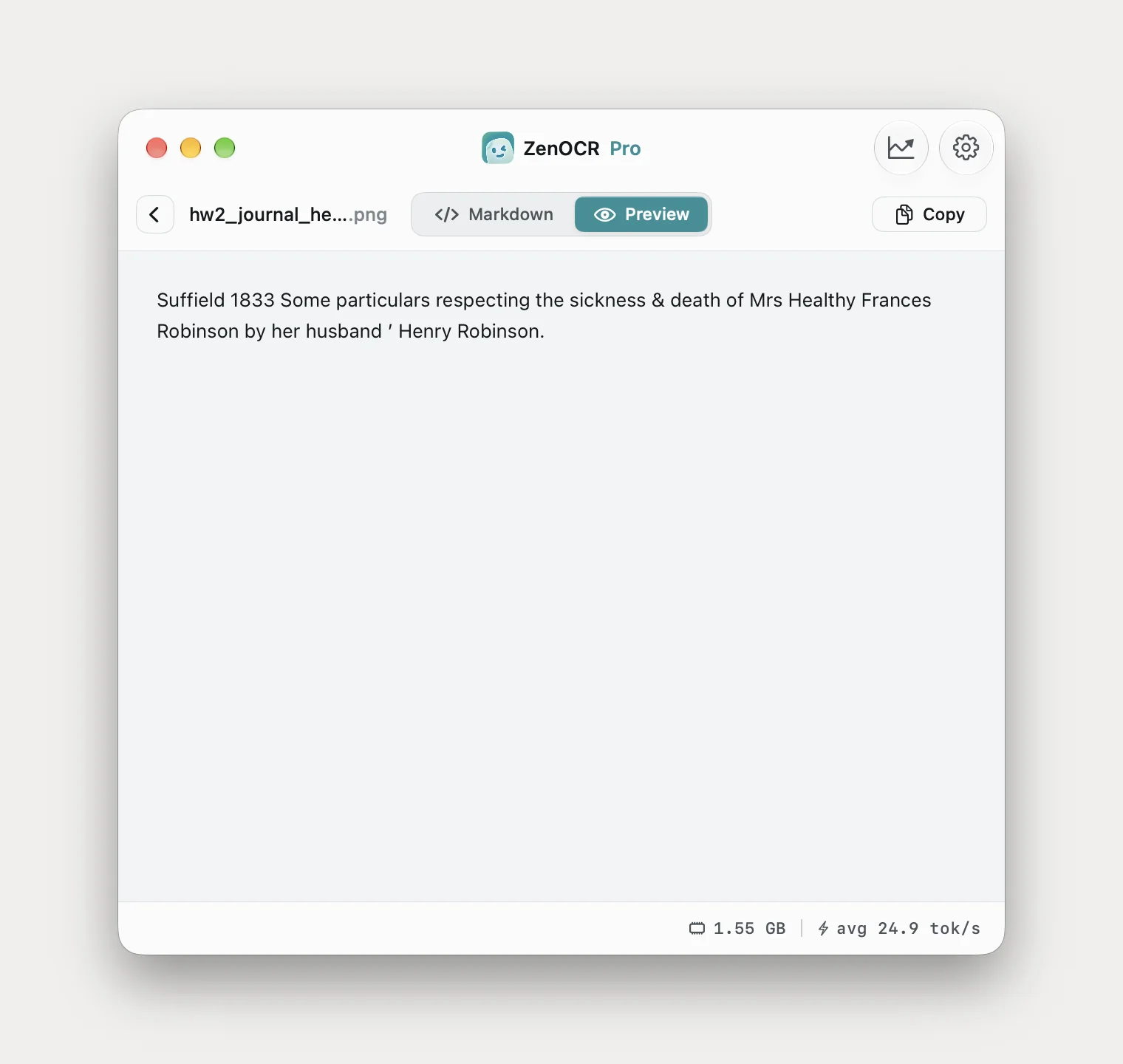
Suffield 1833
Some particulars respecting
the sickness & death of Mrs Healthy
Frances Robinson by her husband
' Henry Robinson.
One wrong word, "Healthy" for "Wealthy", and a stray apostrophe.
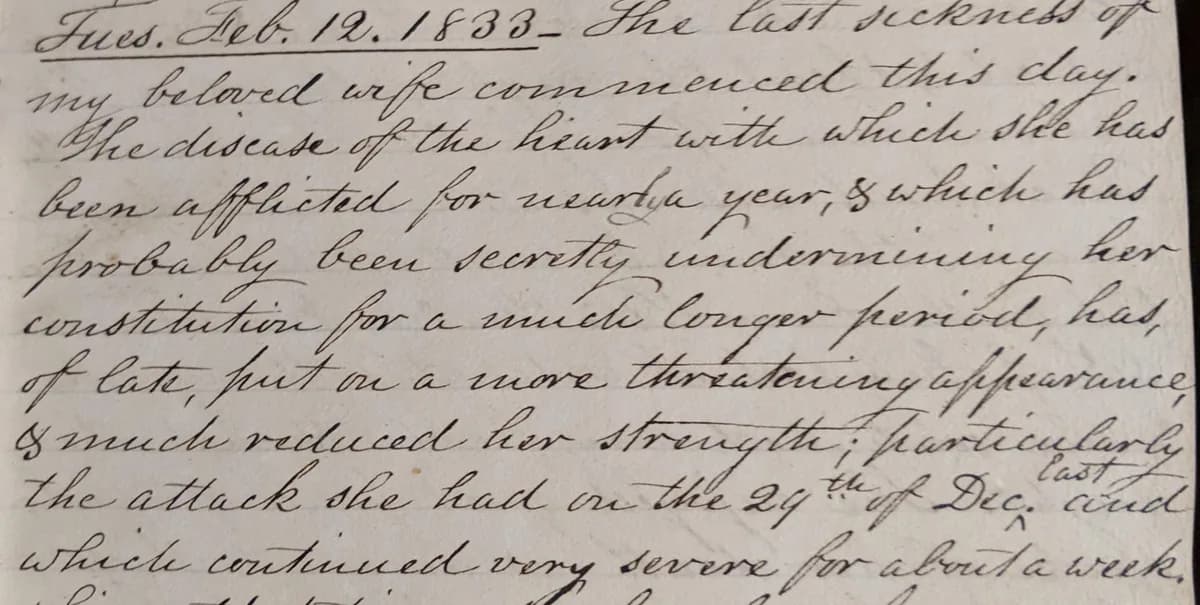
Ілеб. Пев. 12. 1833- the last scenes of
beloved wife commenced this day.
he dideade of the heast with which she has
been afflicted for westa year, s which has
probably been decritty undermining her
constitution for a nice longer period had,
Opens by hallucinating Cyrillic. "the last scenes of" should be "The last sickness of".
ee
Lee nlf fo wench prs hake Kad
pore Oa ble ee decrilie cinccharenetecetey her
ff Cade; frrT te a. trove. Ltiriate e afficarnuee
Ce oe ee. og Wee hak
aterete cevMre tee as A Maacnare far abee/ az tech,
Zero correct words.
Fues. Feb. 12. 1833_ The last sickness of my beloved wife commenced this day. The disease of the heart with which she has been afflicted for nearly a year, & which has probably been secretly undermining her constitution for a much longer period, has, of late, put on a more threatening appearance, & much reduced her strength; particularly the attack she had on the 24th of Dec. and which continued very severe for about a week.Three errors: "Fues." for "Tues.", "24th" for "29th", and the caret insertion "last" dropped from "Dec. last and".
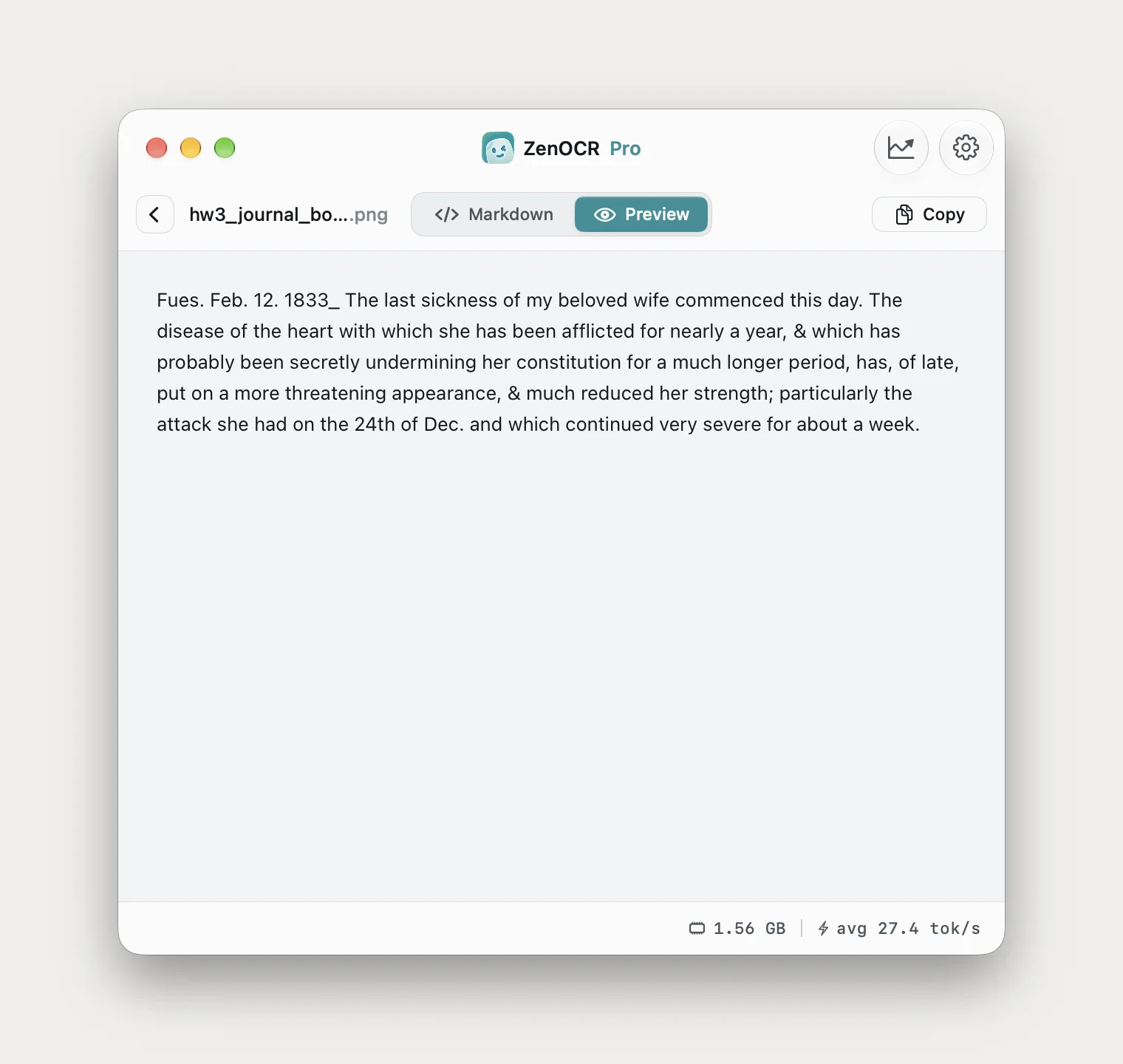
Three errors in eighty words, two of them on the dateline and the date. This is the honest shape of the result: the prose is transcribed, the numerals and the marginal insertion are not reliable, and a transcription you intend to keep still needs a read-through against the original.
Sample 4: the whole page, where the wrong model rewrites it
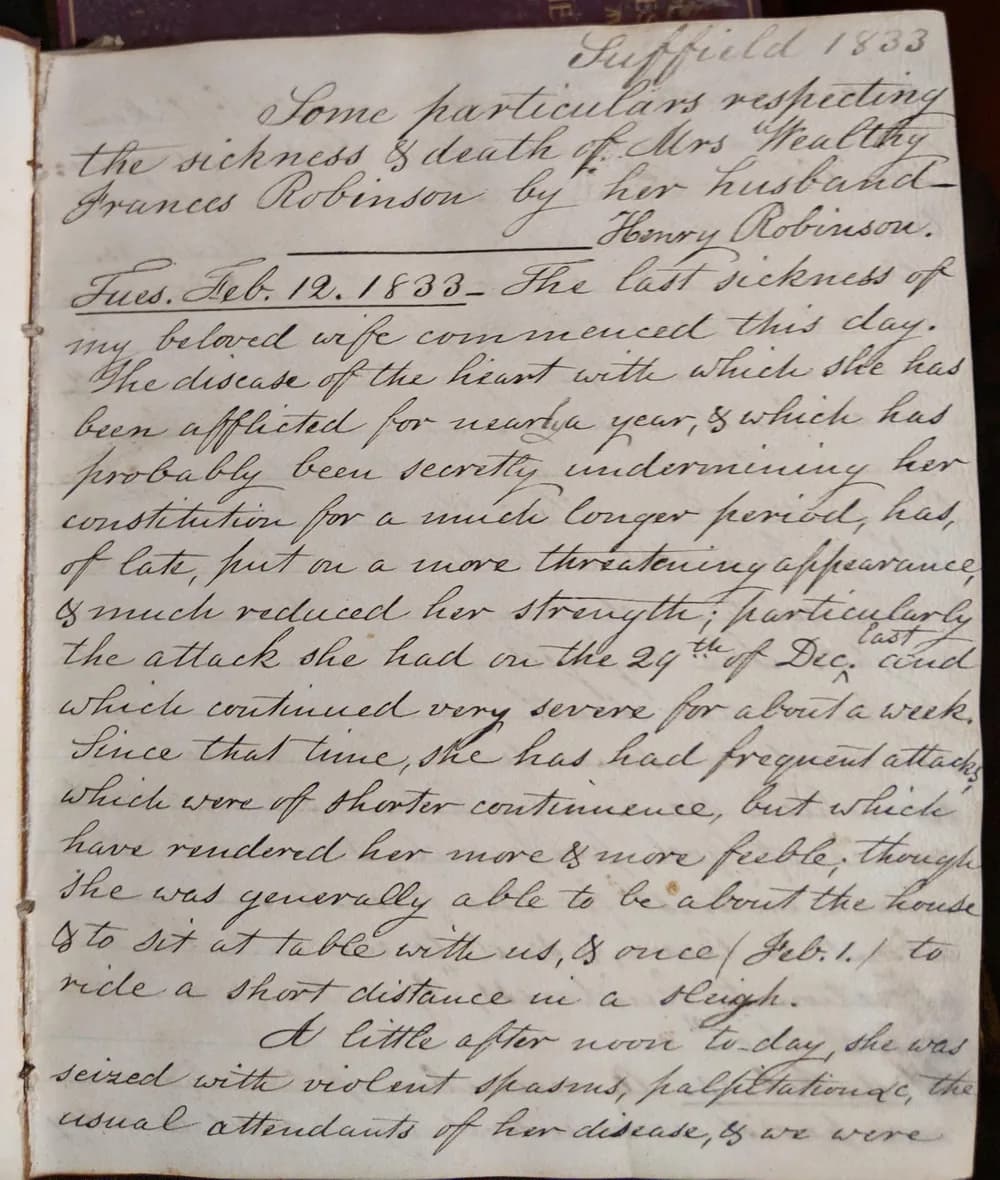
Rather than print four long columns, here is what each engine returned by volume, against a page holding roughly 950 characters of text:
| Engine | Output | Verdict |
|---|---|---|
| Apple Vision | 890 chars | Right length, wrong words. "Luppield 1803", "seired with violent spass". |
| Tesseract 5.5.3 | 620 chars | No recoverable words. |
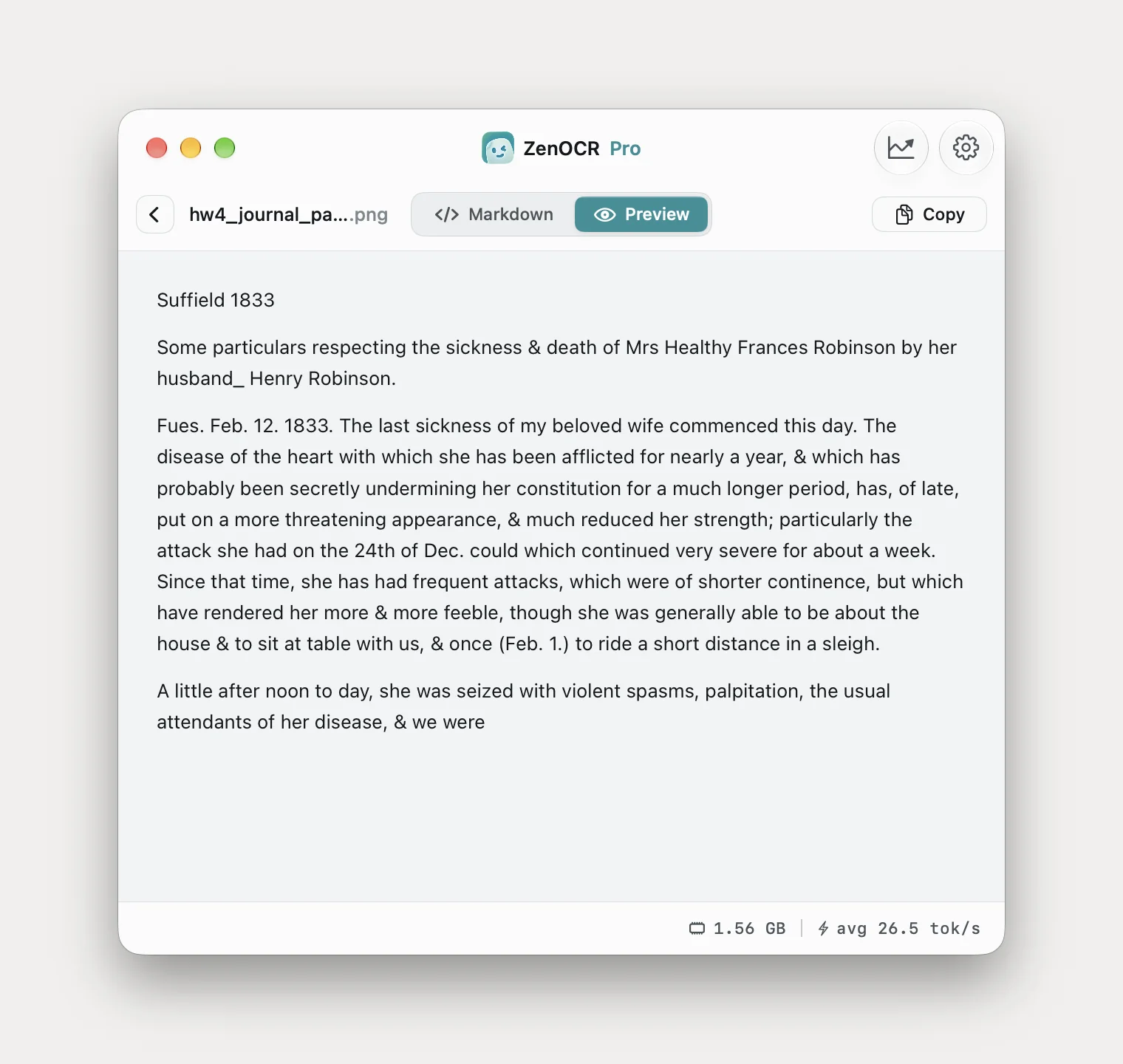
| ZenOCR AI mode, GLM-OCR | 947 chars | Near-complete transcription. The same "Fues." and "24th" errors as sample 3, and here the caret insertion came out as "could". |
| ZenOCR AI mode, DeepSeek-OCR-2 | 912 chars | Full length, but it read "my beloved wife" as "my father" and lost the dateline. |
That last row is the reason the app ships two models and puts the choice in front of you. DeepSeek-OCR-2 is the stronger of the two on clean printed documents and tables, and on handwriting it is clearly the weaker: it produced a full-length transcription that reads fluently and changes who the diarist is writing about. GLM-OCR is the one to use for pages like this, and if a result looks off, switching model is the first thing to try.
Doing it on your own Mac
Drop the image or PDF onto ZenOCR, confirm the model selector at the bottom of the window is on a GLM-OCR build rather than Fast mode, and press Start. Pages queue and run one at a time, so a box of scanned letters can go in as one batch.
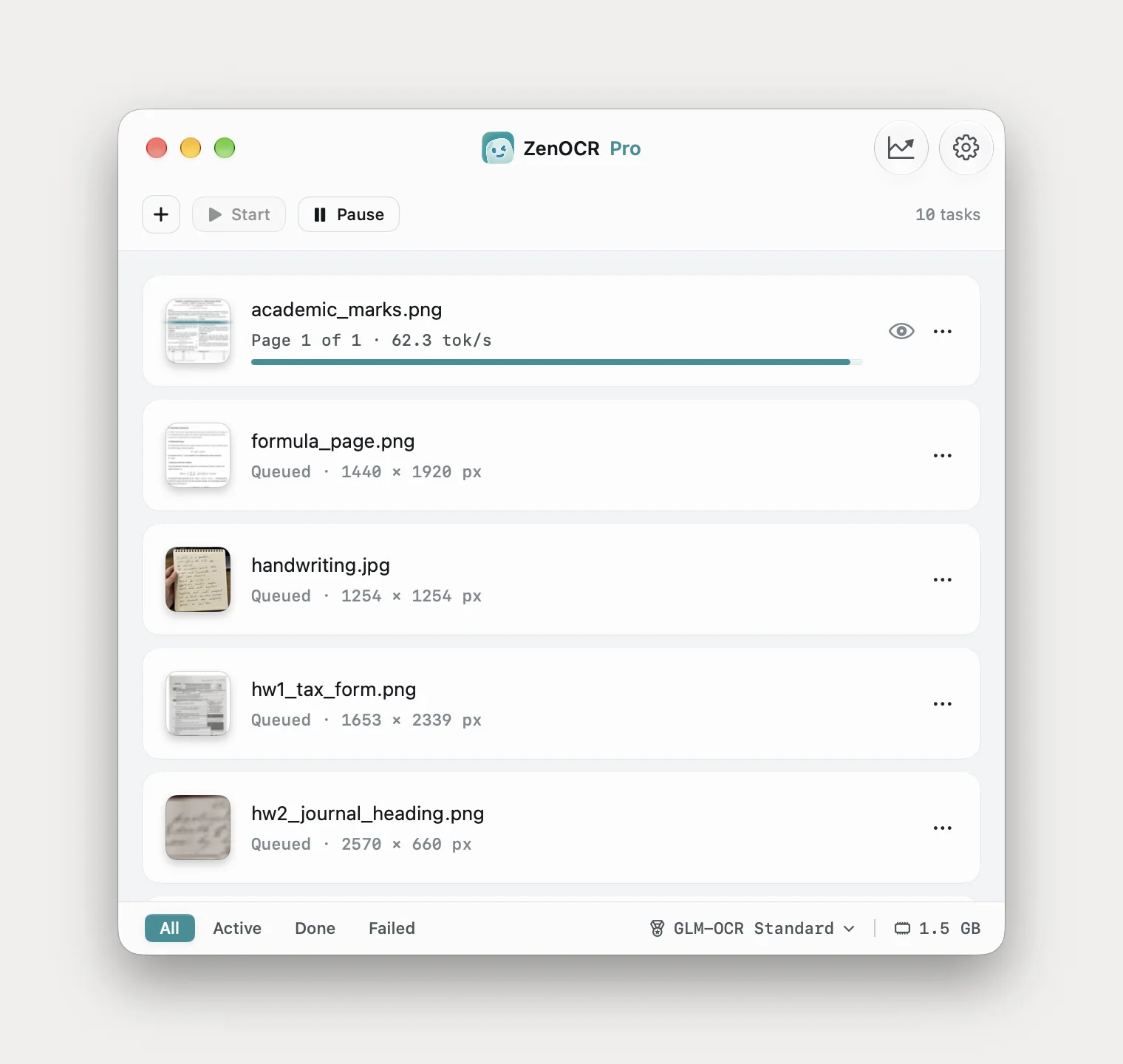
Two things that changed my results more than any setting:
- Photograph the page flat and evenly lit. Curl and shadow cost more accuracy than resolution does.
- Crop to one block of writing when a page fails. Sample 2 and sample 3 are crops of sample 4, and the cropped paragraph came back slightly cleaner than the same paragraph read as part of the whole page.
Why handwriting is the private case
Every accurate handwriting service ranking for these searches is a cloud service. Transkribus, handwritingocr.com and the pen-to-print apps all require you to upload the pages, and their accuracy is real, so this is a genuine trade rather than a talking point.
It is worth thinking about anyway, because handwriting skews personal in a way print does not. Print is usually something an institution sent you. Handwriting is diaries, letters, clinical notes, case files, and a box of paper someone left behind. The pages in this article are a dying woman's medical history written by her husband in 1833, which is only publishable because everyone involved has been dead for a century.
ZenOCR downloads its models once on first launch and does not contact the network again. The pages stay on the machine. That is a statement about where the files go, not a certification of anything.
What it still cannot do
- Not accurate enough to skip proofreading. Every sample above contains at least one error, and on samples 3 and 4 those errors are dates. Read a transcription you intend to keep against the page.
- No searchable PDF of your scans. Text and Markdown come out; nothing is written back into the PDF. If you want a box of scanned letters to stay scans and also become Cmd-F searchable, that is Preview's File > Export with Embed Text, covered in the Preview walkthrough, or Acrobat.
- macOS 14 or later, Apple Silicon for AI mode. No Windows, no iPad, no web version, and Intel Macs cannot run the models.
What I would actually tell you to do
If your handwriting is block printing on forms, try Live Text first. It is already installed and it costs nothing.
If it is cursive, nothing on your Mac will read it and Tesseract will waste your afternoon. The real choice is between uploading the pages to a cloud service and running a model locally. If the pages are letters from strangers you are transcribing for a project, upload them and use the best service you can find. If they are your family's, or your clients', run them locally.
More on the other cases: handwritten and printed mathematics, turning PDFs into Markdown offline, and what macOS Preview can and cannot read. What the app does beyond handwriting is on the ZenOCR homepage.