Extracting LaTeX from a PDF works for fragments and does not work for documents. An equation, a table, a page of maths: those come out as usable LaTeX. A whole paper rebuilt as a .tex project that compiles, with its floats, references and bibliography in place, does not, and no tool on the market delivers it. Anyone promising otherwise is selling you a disappointment.
Inside that limit the difference between tools is large. Below are three pages of real academic maths run through Apple's Vision recognizer, Tesseract 5.5.3 and the two local vision-language models ZenOCR ships, with the output printed as it came out. On the first page one engine is unusable and one is nearly perfect. On the third page the answer depends on which model you pick and how you scanned it, which is worth more than a verdict.
What people are actually complaining about
The pattern in r/LaTeX and r/math is not that Mathpix is bad. It is that Mathpix is good and metered. A thread titled "What is a truly free tool to extract LaTeX from PDFs or images (without limits or paid upgrades)?" has the original poster explaining the friction in one line: "After 15 pictures it will ask for premium." A reply in the same thread makes the opposite case just as fairly, that if you need this daily then the subscription is worth less than half a lunch.
Both are right, and which one is right for you is a volume question. Someone snipping four equations a week never leaves the free tier. Someone digitizing a term of lecture notes hits the wall in an afternoon.
What it costs, checked on 23 August 2026
| Tool | Price | Upload required | Handles equations |
|---|---|---|---|
| Apple Vision (built into macOS) | Free | No | No |
| Tesseract 5.5.3 | Free | No | No |
| Mathpix Snip Free | Free, 10 PDF pages + 10 images per month | Yes | Yes |
| Mathpix Snip Pro | $4.99/mo, or $49.90 billed yearly | Yes | Yes |
| Pix2Text, Texo (open source) | Free | No | Yes |
| ZenOCR | Free 7-day trial, then $12.99 once | No | Yes |
Prices above were read off the vendors' own pages on 23 August 2026 and will drift. The comparison is also not like for like: Mathpix sells an API, far higher volumes and a chemistry mode, none of which a $12.99 Mac app has. What the one-time purchase buys is a different shape of deal, not a bigger one. Against Snip Pro monthly it pays for itself in under three months, and against the annual plan in about three.
Underleaf and the various browser-based converters are the other common answer. They work, and they require the PDF to be uploaded, which for an unpublished manuscript or unreleased data is often the end of the conversation.
Three pages of maths
Apple Vision was run through VNRecognizeTextRequest (revision 3, accurate, language correction on), which is the recognizer behind Live Text and behind ZenOCR's free Fast mode. The AI column is ZenOCR in AI mode running GLM-OCR locally on an M2 MacBook Air. AI mode is the paid tier, available during the trial. Every model column below is the app's own output, screenshotted from the window it came out of; on the table page I also ran the same model through a standalone harness and the table came back identical.
Page 1: display and inline equations
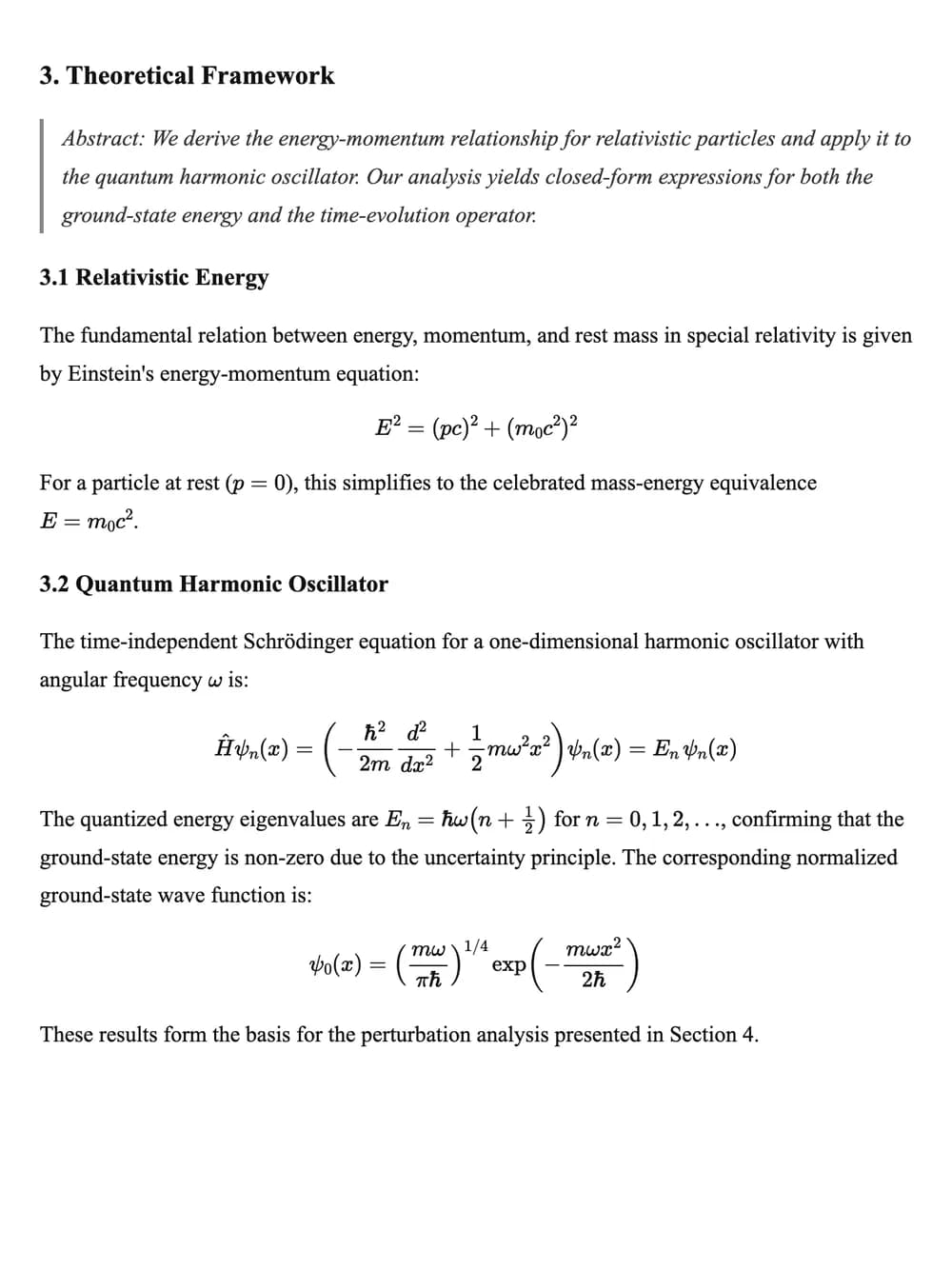
E? = (pc)?+ (moc?)?

E=moc.

Yo(2) = (ne) '4
exp -"
mwx?
Superscripts became question marks. The Schrodinger equation is simply absent from the output.
= (pe)? + (moc*)?

E=mc'.

Ay,(2) - (-ES4 +d mue? *) nla) = Ey Dnt)

vole) = (2) ex(-S )
Present but meaningless. It did not drop the equation, it transliterated it into punctuation.
$$E^2 = (pc)^2 + \left(m_0 c^2\right)^2$$

$$E = m_0 c^2.$$

$$\hat{H} \psi_n(x) = \left(-\frac{\hbar^2}{2m} \frac{d^2}{dx^2} + \frac{1}{2} m \omega^2 x^2\right) \psi_n(x) = E_n \psi_n(x)$$

$$\psi_0(x) = \left(\frac{m \omega}{\pi \hbar}\right)^{1/4} \exp\left(-\frac{m \omega x^2}{2 \hbar}\right)$$
Correct LaTeX for all four, delimiters included, plus the inline maths in the running text.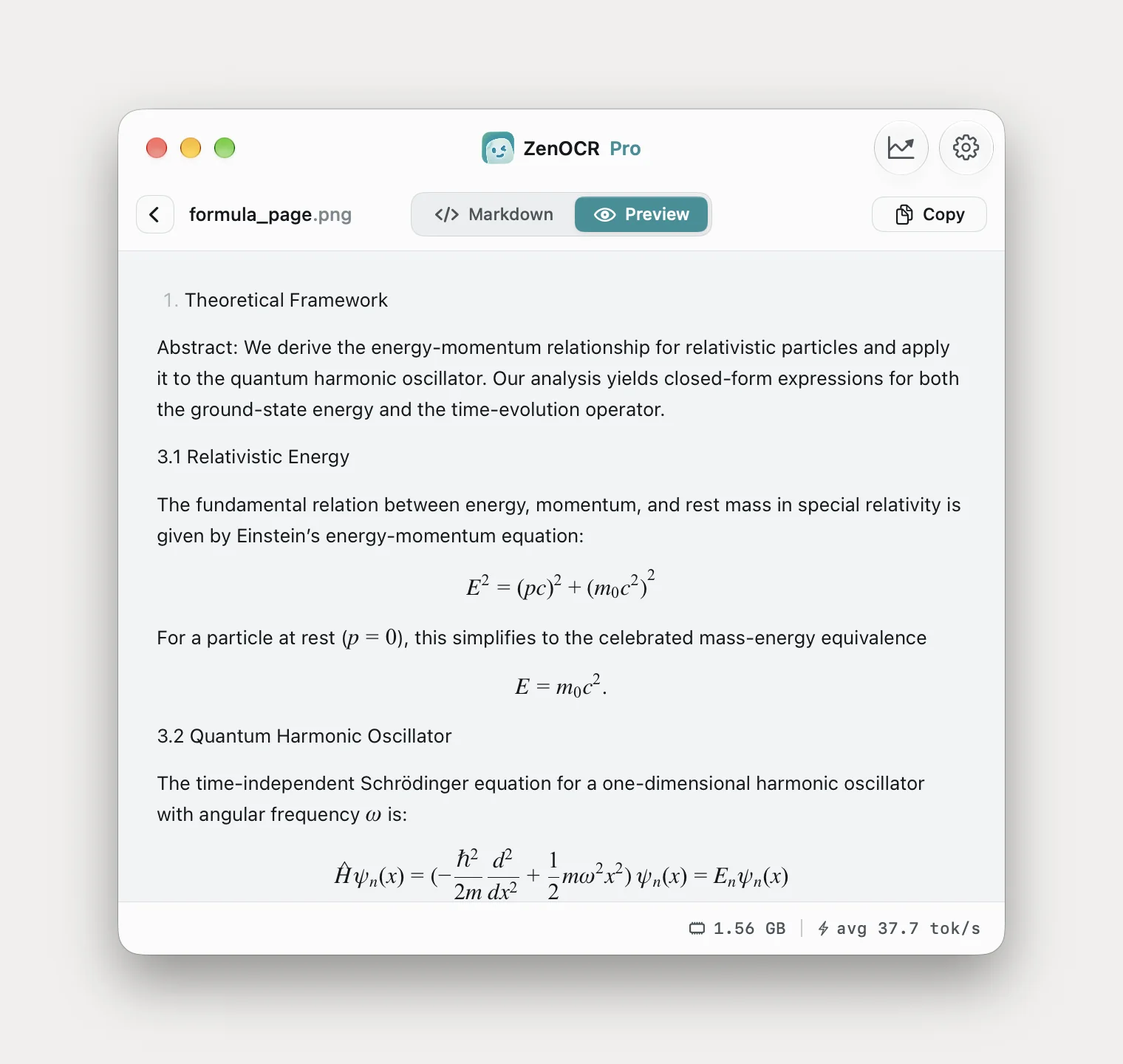
Compare the third equation across the columns. Vision dropped it. Tesseract turned it into Ay,(2) - (-ES4 +d mue? *) nla) = Ey Dnt). GLM-OCR produced the Hamiltonian correctly, with \hbar, the second derivative and the subscripted eigenvalue all in place, and the ground-state wave function after it. That is the whole gap on this page: two engines that cannot represent an equation at all, and one that writes it in the notation the equation was set in.
Page 2: statistical notation
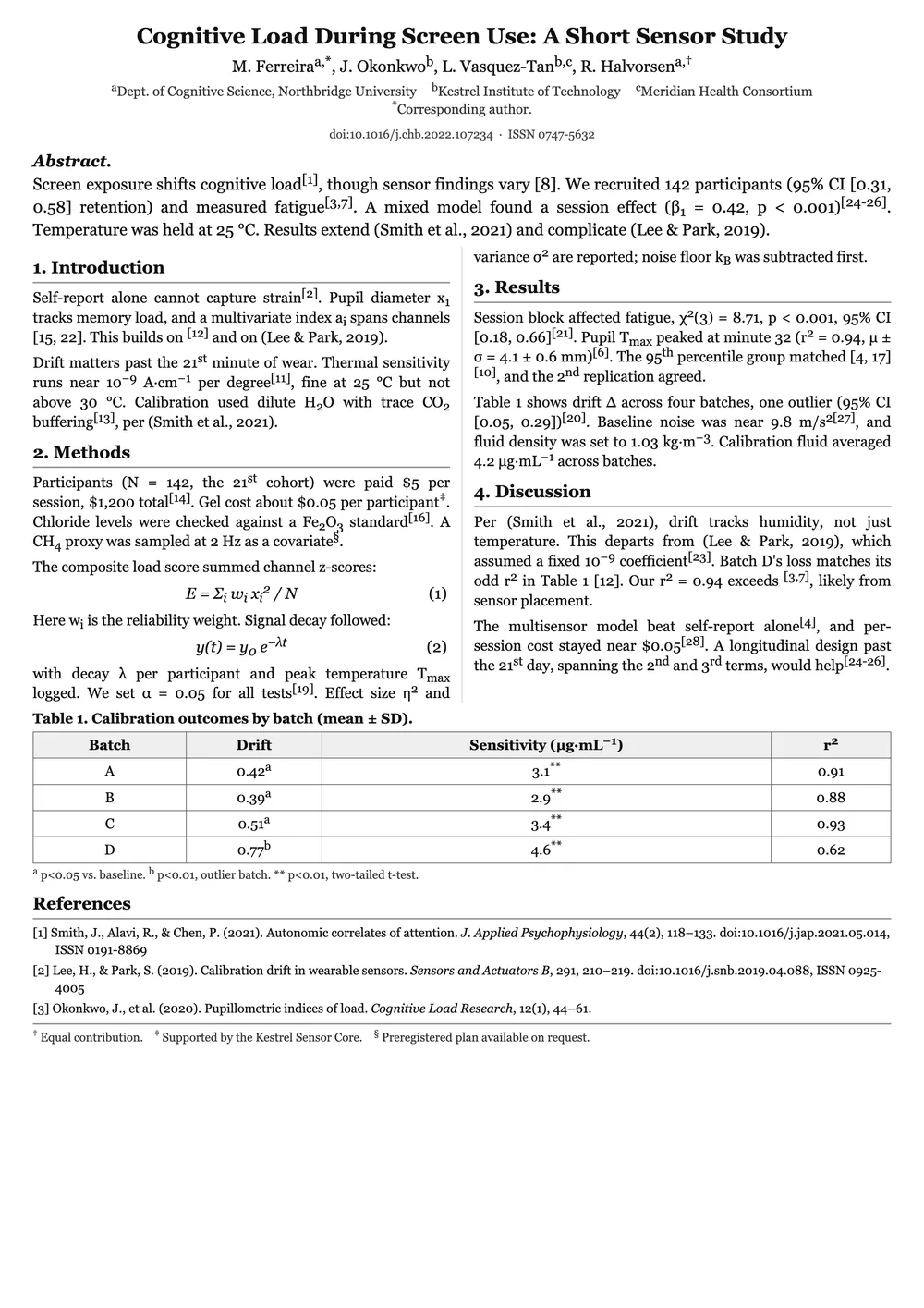
Screen exposure shifts cognitive load!!, though sensor findings vary [8]. We recruited 142 participants (95% CI [0.31, 0.58] retention) and measured fatiguel3.7], A mixed model found a session effect (B, = 0.42, p < 0.001)|24-261.Words right, notation wrong. Every citation marker is corrupted and beta became a capital B.
Screen exposure shifts cognitive load[1], though sensor findings vary [8]. We recruited 142 participants (95% CI [0.31, 0.58] retention) and measured fatigue[3,7]. A mixed model found a session effect ($\beta_1 = 0.42$, $p < 0.001$)[24-26].Word for word correct, with every citation marker, the confidence interval and the Greek subscript intact.
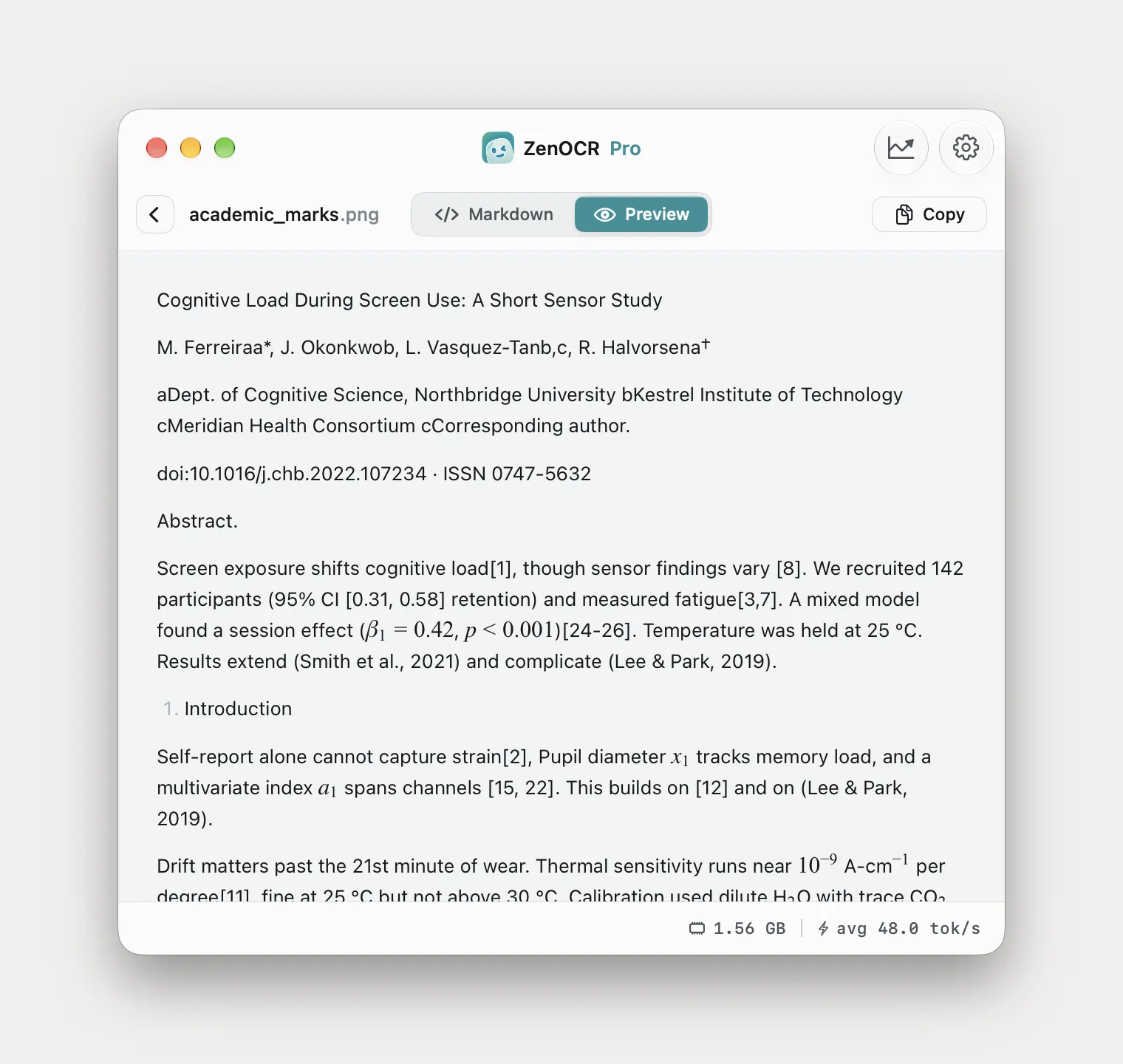
The two columns fail in opposite directions, and the difference is worth understanding before you rely on either. Vision mangles notation but never invents a word, because it has no vocabulary to invent from: [24-26] becomes |24-261, which is wrong in a way you can see.
A language model resolves ambiguous pixels with what usually follows what, so when it does fail it hands you something plausible instead of something obviously broken: a date read as a different, entirely valid date, a name read as a more ordinary name. Both of those happen elsewhere in this series. It did not happen on this page, and that is exactly why you read the words back against the original rather than trusting a clean-looking result.
Page 3: a dense numeric table, where the model choice decides it
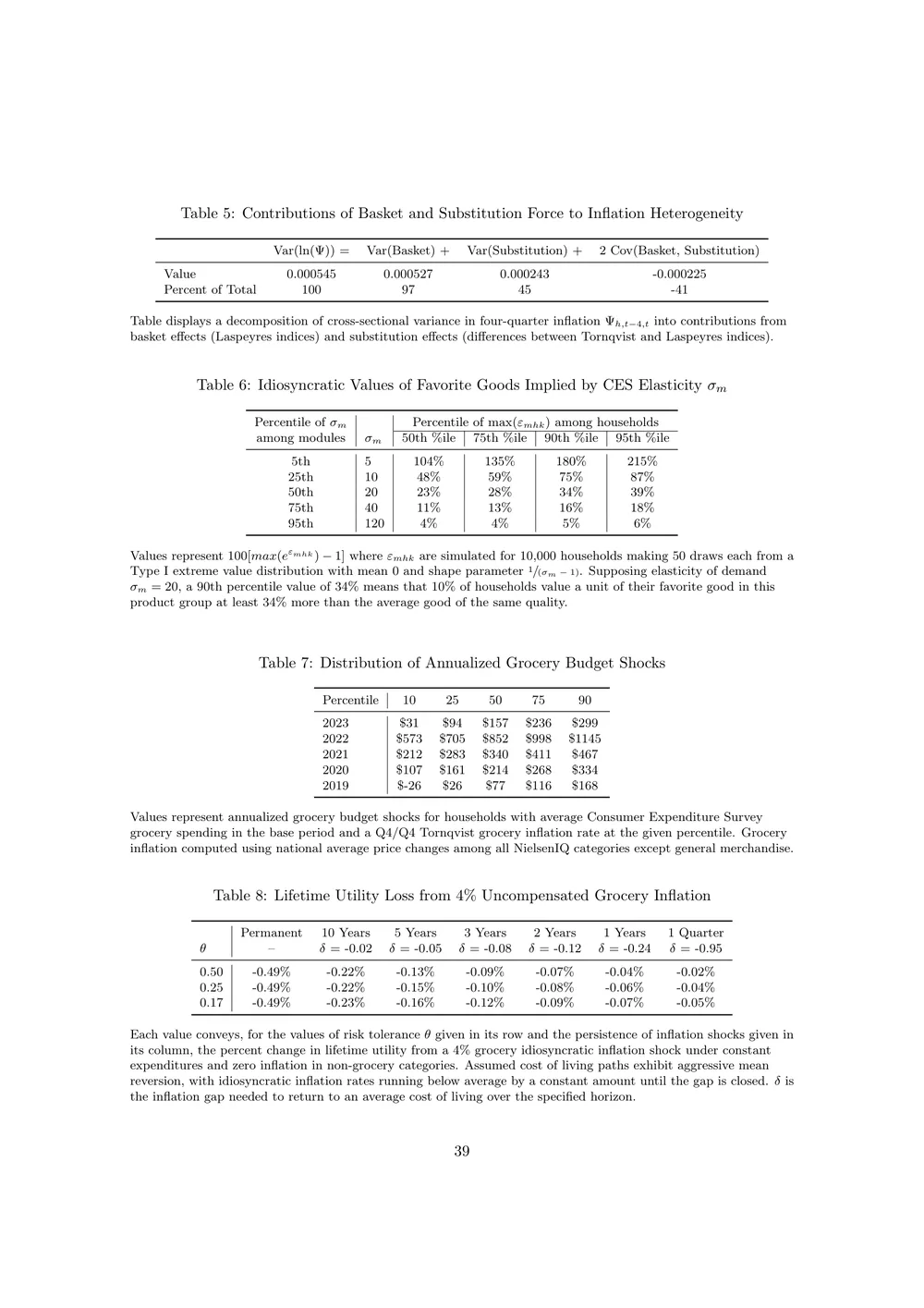
Var(In(#)) =
Var (Basket) +
0000515
0.00527
Var(Substitution) + 2 Cov(Basket, Substitution)
0-000213
-0.000225
-41
Values separated from their headers, and three of the four figures corrupted. Nothing reconstructable.
Table 5: Contributions of Basket and Substitution Force to Inflation Heterogeneity

<table><tr><td></td><td>Var(ln( $\Psi$ )) =</td><td>Var(Basket) +</td><td>Var(Substitution) +</td><td>2 Cov(Basket, Substitution)</td></tr><tr><td>Value</td><td>0.000545</td><td>0.000527</td><td>0.000243</td><td>-0.000225</td></tr><tr><td>Percent of Total</td><td>100</td><td>97</td><td>45</td><td>-41</td></tr></table>
Caption, header formula and both data rows, all figures correct, with the inline maths kept as LaTeX.
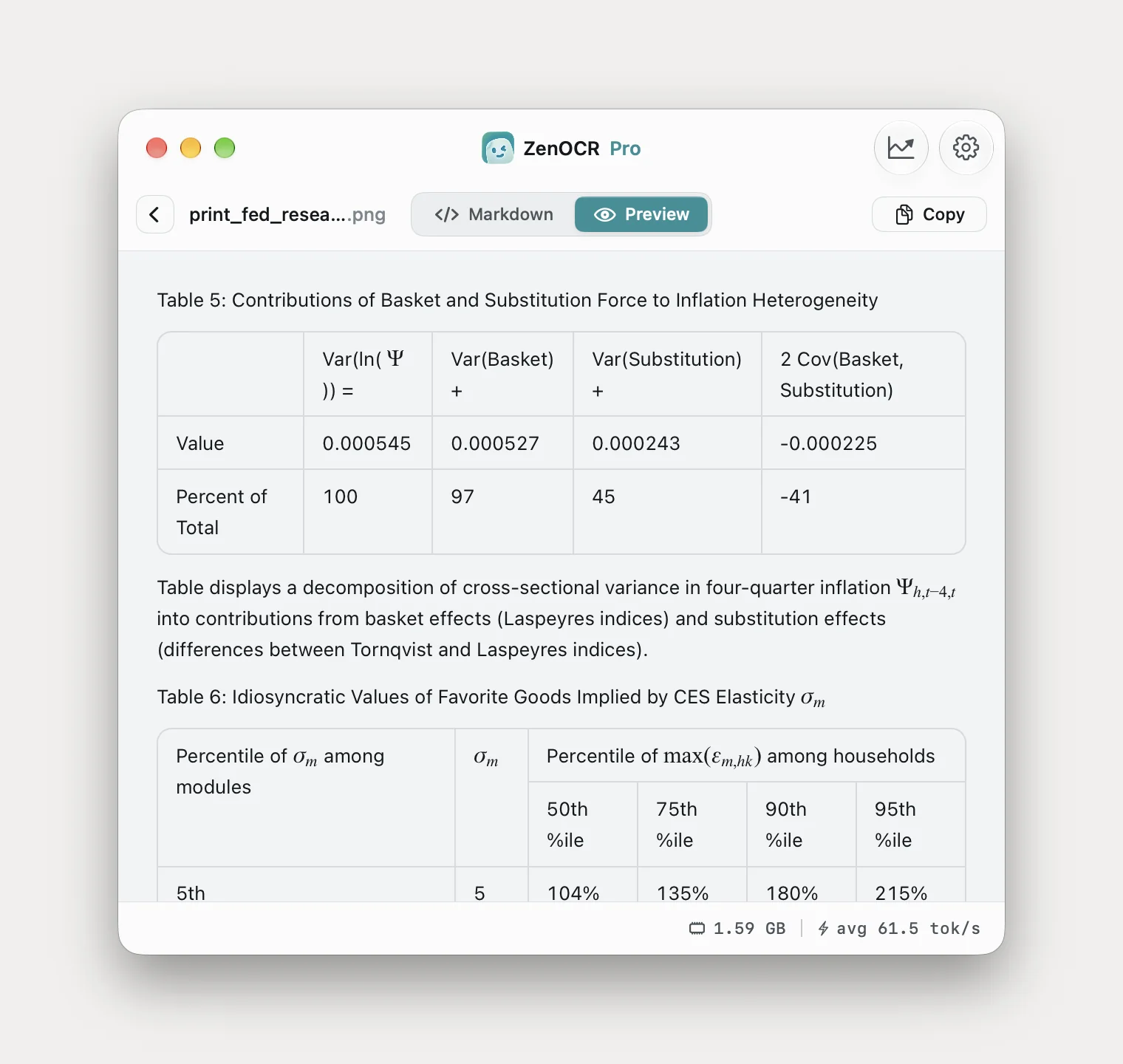
The percentile matrix below it came out the same way, with rowspan on the two leading headers, colspan on the percentile band, and all thirty cells in place. So did the two tables after that, with one blemish: in the currency table every $ was read as the start of a maths span, so $31 came out as \(31. The figures are right and the dollar signs need a find-and-replace.
Two things decide this page. The first is which model reads it: this is DeepSeek-OCR-2, the one the picker labels best for clean documents, and it is the right choice for dense typeset tables. The second is resolution. DeepSeek is fed close to the native image rather than a downscaled copy, and on a table this dense that is the difference between correct figures and approximate ones. Scan at 300 DPI rather than 150 and the table survives.
Why classic OCR turns an equation into punctuation
Tesseract and Vision segment an image into character-shaped regions and match each against learned glyph shapes. Mathematics defeats that at the first step. A superscript is spatially the same object as a full-size character, only smaller and higher, and a segmenter with no model of the line has no way to encode "higher". Fraction bars are horizontal rules. An integral sign spans three notional character heights. \hbar is a letter with a line through it that appears in no natural-language alphabet.
So the output is not "the equation with mistakes in it". It is the equation's ink described as the nearest available punctuation, which is exactly what (moc*)? is.
A vision-language model reads the page layout before it reads glyphs, so it registers "this is a display equation" and then writes the equation in the notation such things are normally written in, which happens to be LaTeX. That reframing is the whole reason it works, and page 2 above is the reason it also lets you down occasionally.
Pick by what your page is
| Your PDF is | Use |
|---|---|
| Mostly display and inline equations | A vision-language model. This is where the gap is largest |
| Citations, Greek letters, statistical notation | A model, then reread the words against the page |
| Dense numeric tables | A local model on DeepSeek-OCR-2, scanned at 300 DPI. Check the figures against the page |
| Plain printed prose | Apple Vision, free, already installed |
| Confidential or unpublished | Anything that runs locally. Every cloud tool needs the upload |
| Handwritten | Covered separately in the handwriting article |
Doing it on a Mac
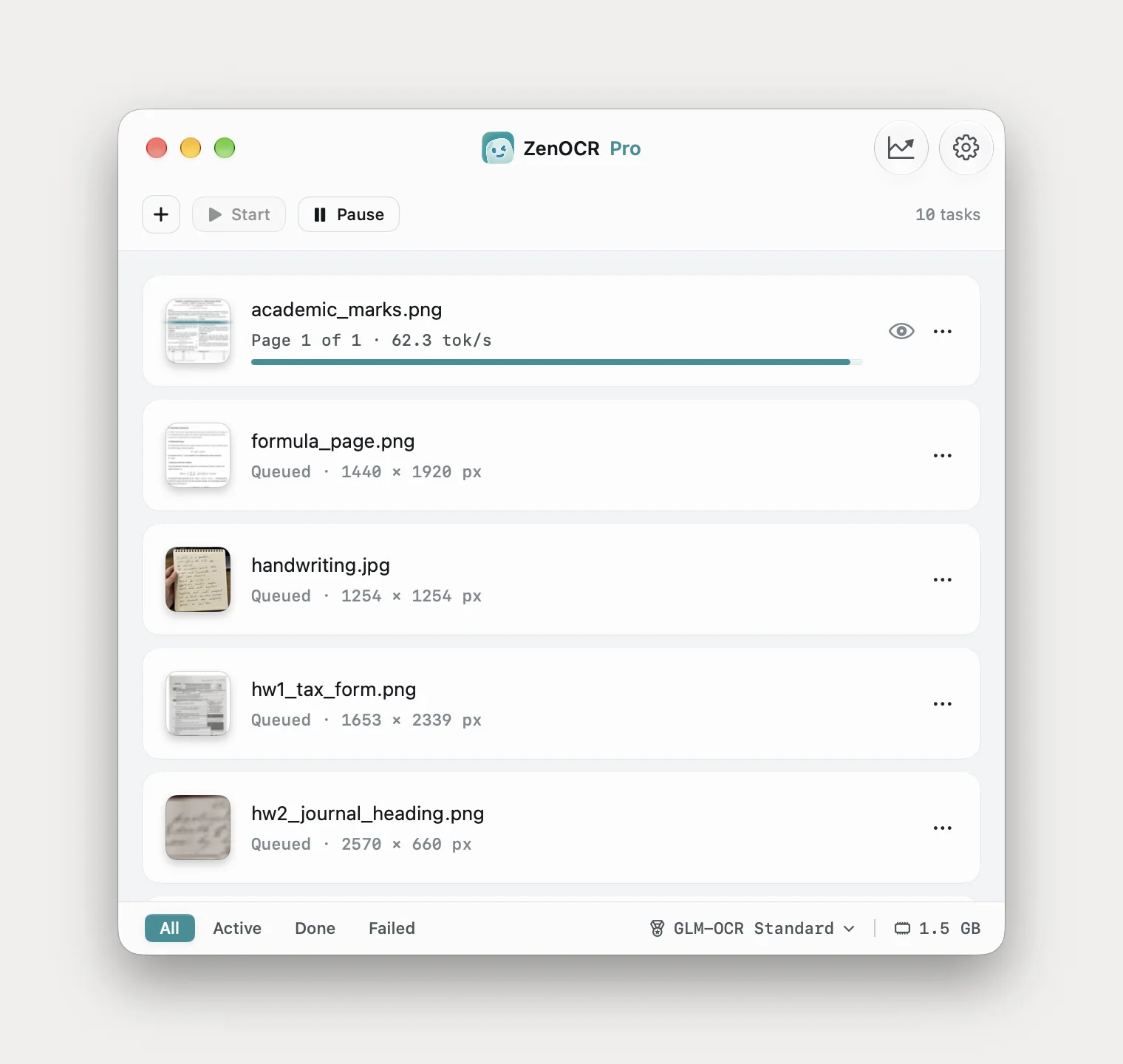
Drop the PDF or the screenshot onto ZenOCR, check the model selector at the bottom of the window is on a GLM-OCR build rather than Fast mode, and press Start. Output is Markdown with LaTeX maths inside it, which pastes into Obsidian, Typora or a .tex file without further conversion.
What it cannot do
- It will not rebuild a paper as a compilable .tex project. Fragments, not documents, and nothing else on the market does this either.
- Dense numeric tables depend on the model and the scan. See page 3: DeepSeek-OCR-2 at 300 DPI rebuilt it, and the other model did not. Check the figures.
- When it does err on maths, the errors are quiet ones. A
$read as a maths delimiter, a figure that is plausible rather than printed. Nothing on these pages announces itself as wrong, so proofread the numbers you are going to act on. - macOS 14 or later, Apple Silicon for AI mode. No Windows, no iPad, no web version.
Honestly, who should buy which
If you snip a handful of equations a month, Mathpix's free tier costs nothing and works, and this article is not trying to move you off it.
If you are working through a stack of papers, you are choosing between a subscription that meters you and a one-time purchase that does not, and the arithmetic is under three months. If the papers are unpublished, or the data is not yours to upload, the arithmetic stops mattering and you want the local one.
Related: converting PDFs to Markdown offline, handwriting OCR on a Mac, and what Preview does to an equation. The app itself is on the ZenOCR homepage.