Most "best OCR for Mac" lists are feature grids where every app sounds different. The useful distinction is smaller and is on none of those grids: four of the popular Mac OCR utilities are wrappers around the same recognition engine. Once you know which, the choice gets simpler, because you are picking a capture workflow rather than an accuracy level.
I checked every price below on 23 August 2026 on the vendor's own page or its Mac App Store listing. I could not install and pay for all nine, so I am explicit about which claims come from running software and which come from published documentation. The app I make is in the table and it does not win most of the rows.
The prices, checked this week
| App | Price | Model | macOS | Recognition |
|---|---|---|---|---|
| Live Text / Preview | Free | Built in | 12+ | Apple Vision |
| Shottr | Free, pay what you want | One-time | 10.15+ | On-device |
| TextSniper | $9.99 (Mac App Store) | One-time | 10.15+ | On-device |
| CleanShot X | $29 one-time, then $19/yr for updates | One-time plus renewals | 10.15+ | On-device |
| OwlOCR | Free tier; $19.99/yr or $49.99 lifetime | Both | 13.3+ | Apple Vision, optional local AI |
| Prizmo 5 | Free download; $9.99/mo, $49.99/yr, or $99.99 | Subscription or one-time | 14.0+ | Own engine |
| ABBYY FineReader PDF | $69/yr, or $186 for 3 years | Subscription | 12+ | ABBYY engine |
| Mathpix Snip | Free 10 pages/mo; $4.99/mo | Subscription | Cloud | Cloud model |
| Adobe Acrobat Pro | Subscription, price varies by region | Subscription | Varies | Adobe engine |
| ZenOCR | 7-day trial, then $12.99 once | One-time | 14+, Apple Silicon for AI mode | Apple Vision or local AI model |
Adobe's pricing page serves a different figure depending on where you load it from, so I am not quoting a number I could not verify for your region. The structural point survives without it: it recurs, and the others in the one-time column do not.
The thing the feature grids hide
Shottr, TextSniper and CleanShot X all describe on-device text recognition on their own pages. OwlOCR is explicit, naming "Apple Vision OCR with optional local AI OCR" in its own description. On macOS, on-device text recognition means the Vision framework, the same one behind Live Text.
So when you compare those apps, you are not comparing accuracy. Feed them the same screenshot and they return the same characters, because the same code read it. What differs is the hotkey, whether it grabs a region or a window, whether it keeps a history, whether it also records screen video.
That is a real reason to pay. A hotkey that puts screen text on the clipboard is genuinely faster than opening Preview and dragging, and it is worth $9.99 to a lot of people. Just be clear you are buying a capture flow, not better reading.
The corollary matters more: if Live Text cannot read your page, none of those apps can either.
Where Apple Vision is completely fine
Worth saying plainly, because a comparison article that finds the free option inadequate at everything is not a comparison, it is an advert.
On a clean 300 DPI scan of an 11pt printed contract, Apple Vision reproduced the whole page word for word, including a clause full of currency figures. A local AI model matched it exactly and did not beat it. Tesseract matched both. For clean printed prose, the recognizer Apple gives you is as accurate as anything you can buy.
Where it runs out
The gap is not character accuracy. It is everything above the character.
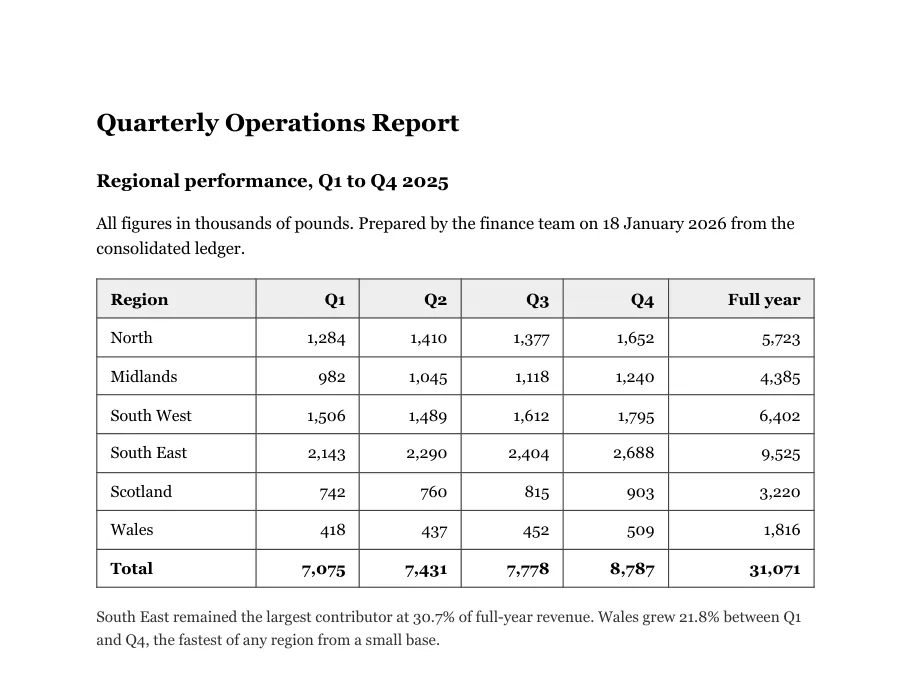
Region
North
Midlands
South West
South East
Scotland
Wales
Total
Q1
1,284
982
1,506
2,143
742
418
All 42 figures read correctly, and not one is in a row. Vision returns text in column order, so the table arrives as a list of columns.
<table><tr><td>Region</td><td>Q1</td><td>Q2</td><td>Q3</td><td>Q4</td><td>Full year</td></tr><tr><td>North</td><td>1,284</td><td>1,410</td><td>1,377</td><td>1,652</td><td>5,723</td></tr><tr><td>Midlands</td><td>982</td><td>1,045</td><td>1,118</td><td>1,240</td><td>4,385</td></tr><tr><td>South West</td><td>1,506</td><td>1,489</td><td>1,612</td><td>1,795</td><td>6,402</td></tr><tr><td>Total</td><td>7,075</td><td>7,431</td><td>7,778</td><td>8,787</td><td>31,071</td></tr></table>Same 42 figures, in cells. Trimmed for width; the omitted rows are equally correct.
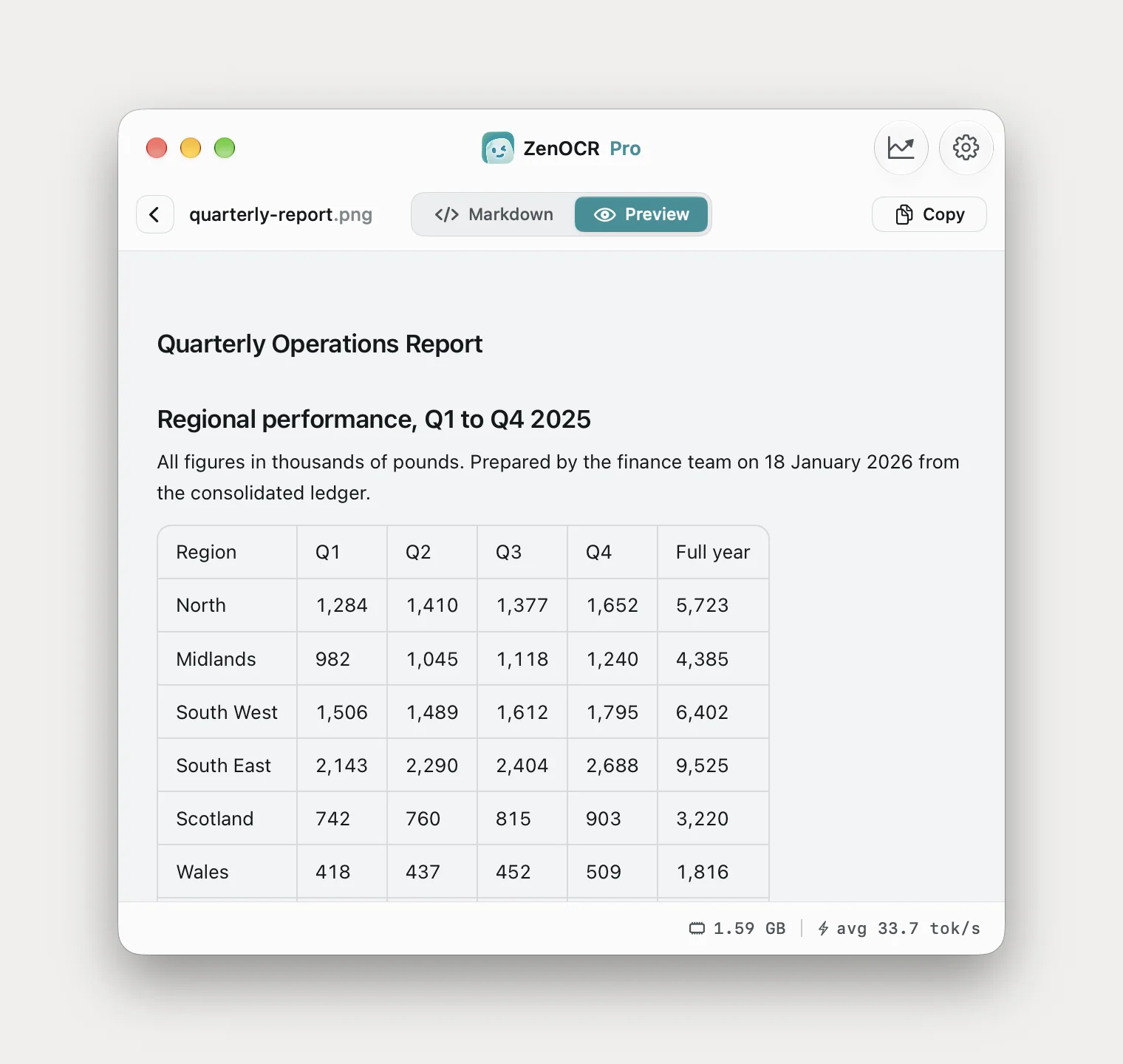
The second place Vision runs out is damaged paper, where the failure is quieter.
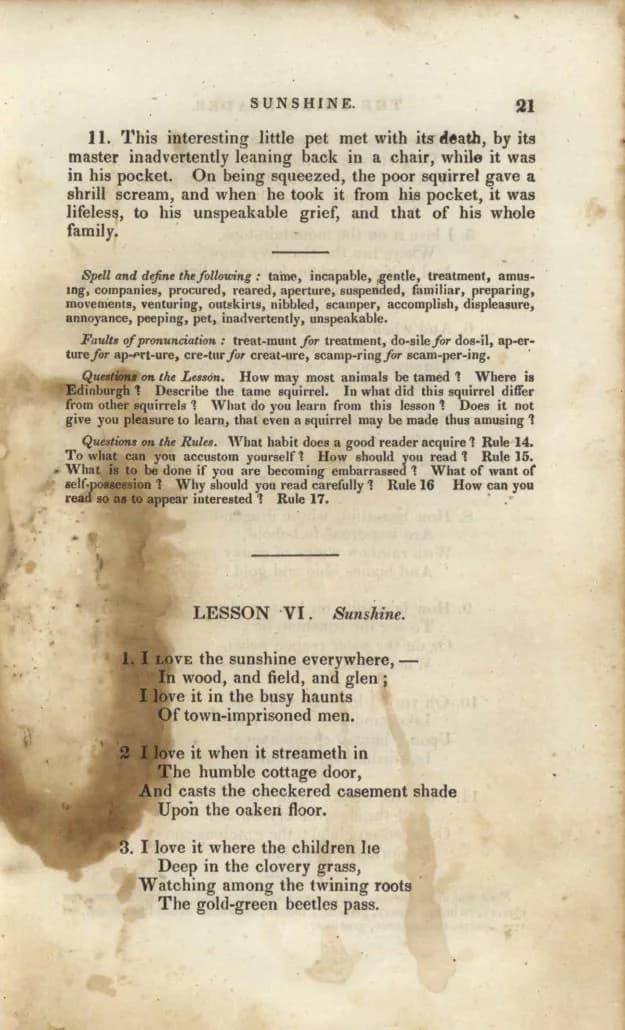
Farlts of pronunciation: treat-munt for treatment, do-sile for dos-il, ap-er-
ture for ap-ert-ure, cre-tur for creat-ure, scamp-ring for scam-per-ing.
To what can you accustom yourself? How should you read 1 Rule 15
What is to be done if you are becoming embarrassed? What of want of
sell-possession 1 Why should you read carefully ?
Three character errors, two question marks turned into the digit 1, and a word silently dropped from the spelling list further up the page.
Faults of pronunciation: treat-munt for treatment, do-sile for dos-il, ap-er-ture for ap-ert-ure, cre-tur for creat-ure, scamp-ring for scam-per-ing.

Questions on the Rules. What habit does a good reader acquire? Rule 14. To what can you accustom yourself? How should you read? Rule 15. What is to be done if you are becoming embarrassed? What of want of self-possession? Why should you read carefully?
All three errors fixed, hyphenation rejoined, punctuation right. It dropped the running head and page number, which Vision kept.
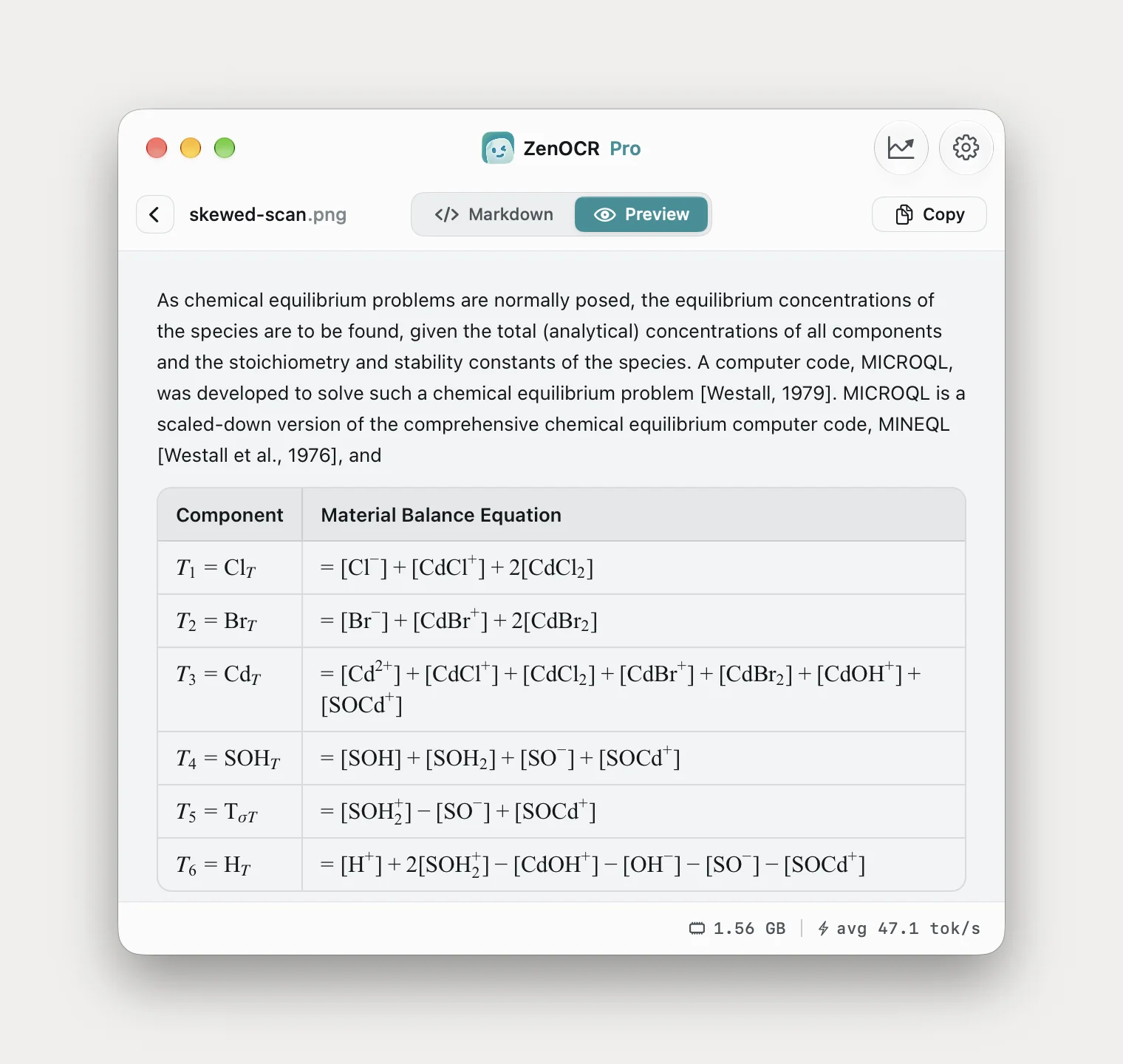
Third is the crooked photocopy, where Tesseract produced E = EI") + poaey~ and Vision returned two of six equations. That page and its output are in the tables article.
So the boundary is four things: tables, faded or stained paper, awkward old print, and handwriting. Everywhere else the free recognizer is the right answer.
Two engines in one app
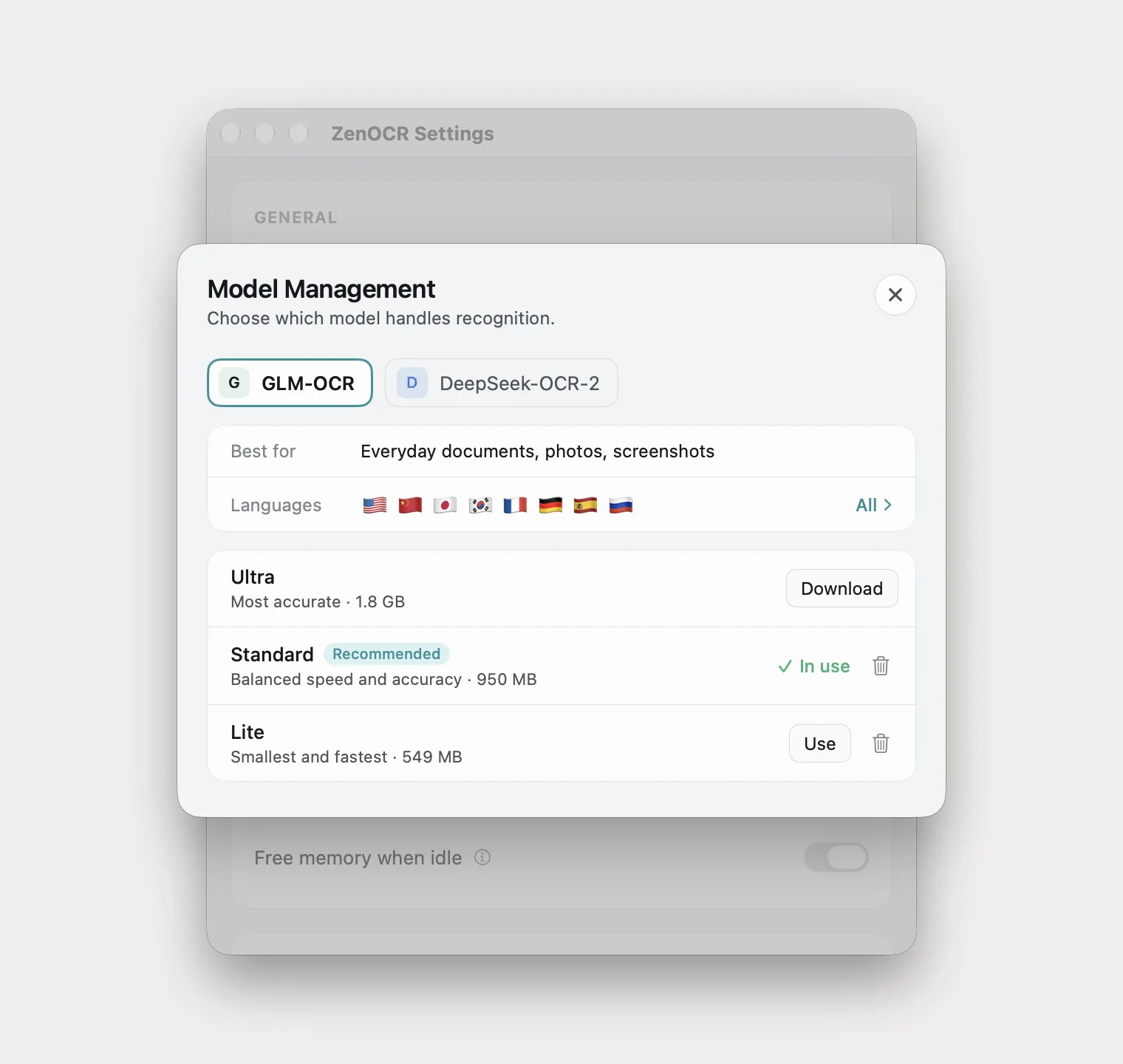
They are not interchangeable and the labels are accurate. DeepSeek-OCR-2 is described as best for clean documents and produced every clean-scan result above. GLM-OCR is described as working for almost anything, and won on the stained page and the crooked photocopy.
Which one to buy
You already have OCR. Open the image in Preview or Quick Look and select the text. If that works and you do it occasionally, buy nothing.
You do this twenty times a day. TextSniper at $9.99 once, or Shottr for free. CleanShot X at $29 makes sense only if you also want annotation and recording.
You need a searchable PDF. Preview's File > Export with Embed Text, free, or Acrobat for batches. OwlOCR also exports searchable PDFs, which ZenOCR does not do at all.
You need tables, damaged scans, old print or handwriting. You need a model, not a wrapper: ZenOCR at $12.99 once running locally, Mathpix at $4.99/mo if pages can be uploaded and the content is maths, or ABBYY at $69/yr for high-volume conversion.
Your files cannot be uploaded. Everything except Mathpix recognizes on the device.
You only pay for Acrobat because of the OCR. Then you are paying a recurring fee for something Preview does free, and you should check what else you use it for. If you edit, redact, merge, sign or fill forms, keep it. ZenOCR does none of those, and switching to save money would be a mistake if you need any of them.
What ZenOCR does not do
- No searchable PDF output. Text and Markdown only. OwlOCR and Acrobat do this and it does not.
- No PDF editing, redacting, merging, forms or signing.
- No Obsidian plugin, no Notion integration. It saves Markdown into a folder, which can sit inside a vault.
- Not the fastest screenshot-to-clipboard tool. TextSniper and Shottr are better at that and one is free.
- No advantage on clean printed prose. Vision matched it exactly on the contract test above.
- macOS 14 or later, Apple Silicon for AI mode. Intel Macs get Fast mode, which is Apple Vision.
The short version
Three tiers, and the gaps between them are large. Free and built in covers most people. A ten dollar one-time utility covers people who capture text constantly. A model-based tool covers four specific cases the built-in engine cannot do, and is worth the money only if you have those pages.
Everything else separating these apps is interface.
All facts and prices verified 23 August 2026 from each vendor's own site or Mac App Store listing. Prices move; re-check before buying. Naming these products is comparison, not affiliation, and none of them endorse this.
Related: extracting tables from a scan, getting text out of a scanned PDF, and handwriting OCR on a Mac. The app is on the ZenOCR homepage.