The Mac OCR category looks crowded and mostly is not. Sort these apps by which engine actually reads the pixels and they fall into three groups, with most of the products people compare against each other sitting in the same group returning the same characters.
I checked every price below on 23 August 2026 against the vendor's own page or its Mac App Store listing, because subscription pricing moves and a stale figure is the one thing a competitor notices. Where I ran the software myself I say so. One of the apps is mine and it loses several of these comparisons.
The fact that sorts the category
macOS ships a text recognizer called Vision. It is what Live Text uses, what Preview's Embed Text uses, and what a Mac app gets when it asks the system to read an image. It is good, it is free, and it costs a developer almost nothing to call.
So the first question about any Mac OCR app is: does it call Vision, or does it bring its own engine? If it calls Vision then whatever it charges, you are paying for the interface. That can be entirely worth it. It just means accuracy is not the axis you are choosing on.
The apps
Live Text and Preview. Free, built into macOS 12 and later. Select text in any image in Preview, Photos, Quick Look or Safari. File > Export with Embed Text ticked runs it across a whole PDF and writes a searchable text layer. Most people who think they need an OCR app need this and a keyboard shortcut.
Shottr. Free, pay what you want, macOS 10.15 or later. A screenshot tool with text recognition attached: hotkey, drag a region, text on the clipboard. On-device recognition per its own page.
TextSniper. $9.99 on the Mac App Store, one-time, macOS 10.15 or later. Direct from the vendor it is $7.99 for one Mac, $9.99 for three, $11.99 unlimited. It does one thing with a hotkey and has been the category default for years.
CleanShot X. $29 one-time including a year of updates, then $19 a year to keep getting them; a Cloud Pro tier is $8 per user per month billed annually. macOS 10.15 or later. A screenshot and recording suite with OCR as one feature among many. Buying it for the OCR alone is the wrong reason.
OwlOCR. Free tier, Pro at $19.99 a year or $49.99 for a lifetime licence. macOS 13.3 or later. Its own page names "Apple Vision OCR with optional local AI OCR for messy screenshots, low-quality scans, and dense layouts", and it exports searchable PDFs with an invisible text layer. That capability is real and ZenOCR does not have it.
Prizmo 5. Free download with in-app purchases at $9.99 monthly, $49.99 yearly, or $99.99 for a Pro Pack. macOS 14 or later. A scanning workflow app: capture, deskew, clean up, recognize, export.
ABBYY FineReader PDF for Mac. $69 a year, or $186 for three years. Subscription only, macOS 12 or later. Its own engine, aimed at volume document conversion.
Mathpix Snip. Free for 10 PDF pages and 10 images a month; Pro $4.99 a month or $49.90 a year. A cloud service, so pages are uploaded. Best in class for mathematics and the only tool here that is not local.
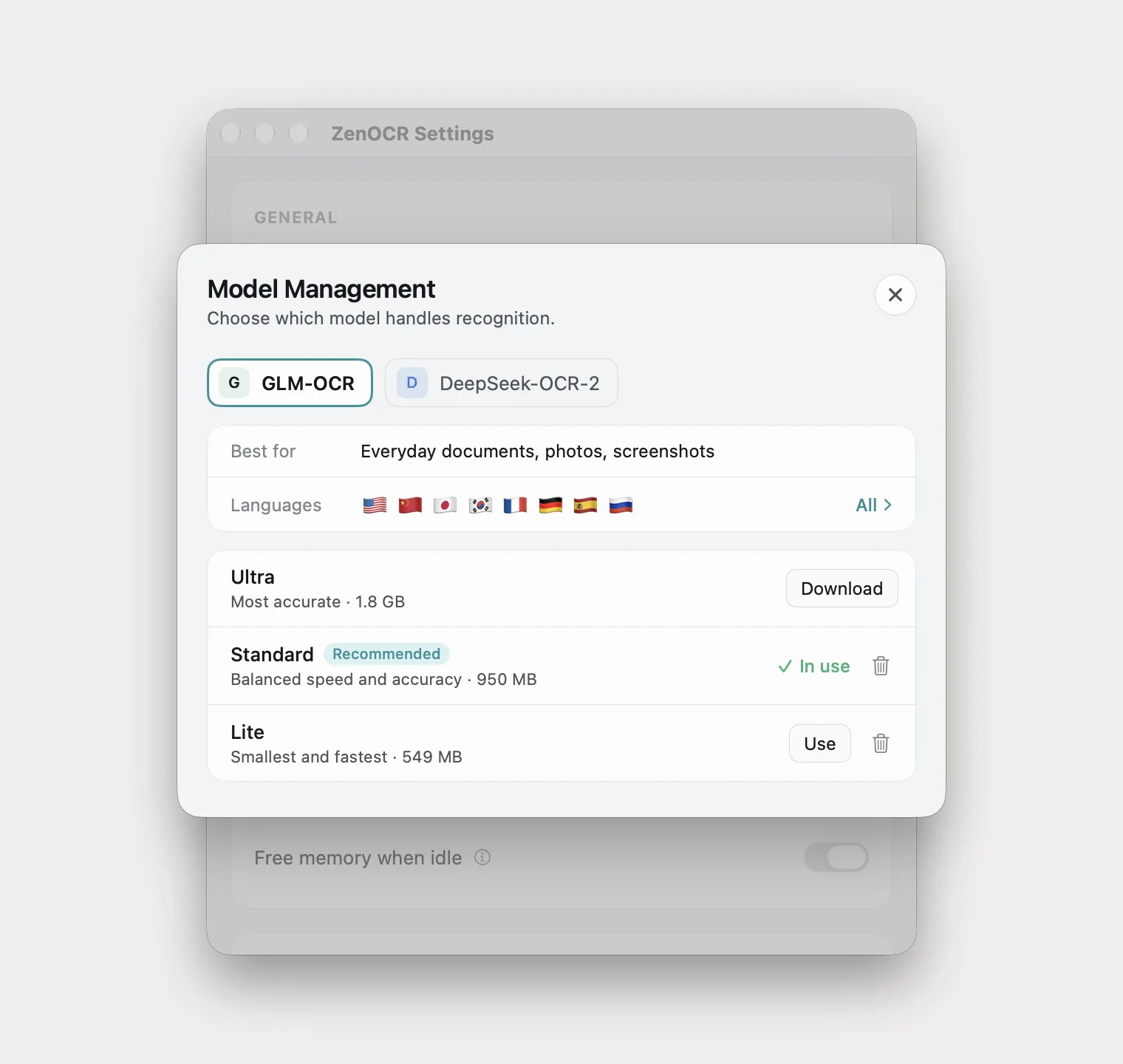
ZenOCR. Free 7-day trial, then $12.99 once, no subscription. macOS 14 or later, Apple Silicon required for AI mode. Fast mode is Apple Vision; AI mode runs a vision-language model locally on the GPU.
Where they stop behaving the same
Anything calling Vision returns identical text, so the question is where Vision gives up. I ran three documents through Vision, Tesseract 5.5.3 and both local models.
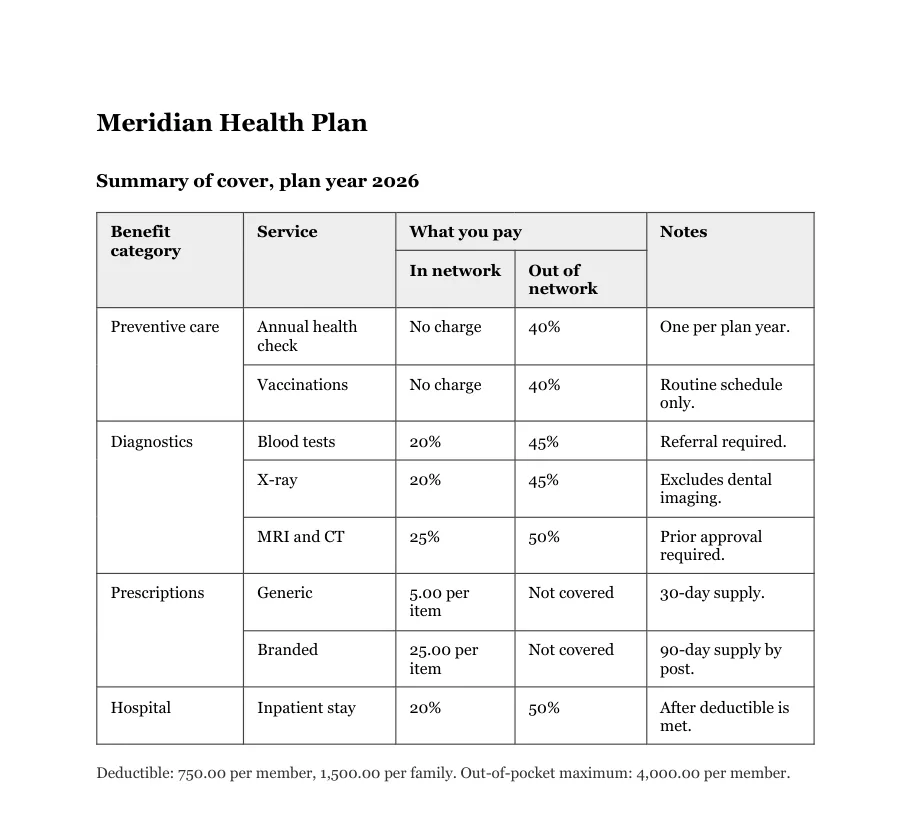
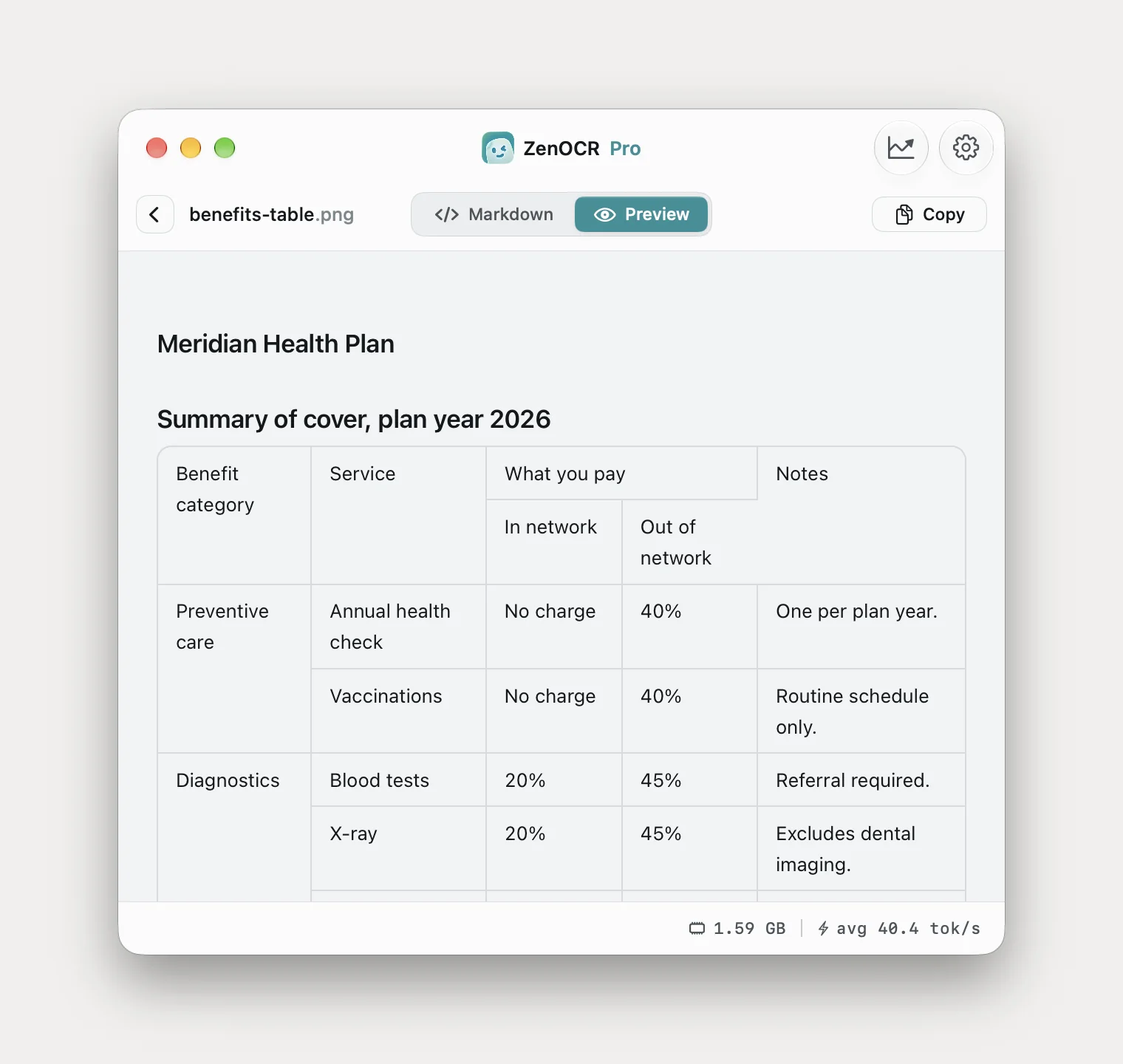
A table with merged cells
Benefit
category
Service
Preventive care
Diagnostics
Prescriptions
Hospital
Annual health
check
Vaccinations
Blood tests
X-ray
MRI and CT
Every character correct, every row gone. The four merged labels arrive together, then all nine service names, then all the percentages.
<table><tr><td rowspan="2">Benefit category</td><td rowspan="2">Service</td><td colspan="2">What you pay</td><td rowspan="2">Notes</td></tr><tr><td>In network</td><td>Out of network</td></tr><tr><td rowspan="2">Preventive care</td><td>Annual health check</td><td>No charge</td><td>40%</td><td>One per plan year.</td></tr><tr><td>Vaccinations</td><td>No charge</td><td>40%</td><td>Routine schedule only.</td></tr><tr><td rowspan="3">Diagnostics</td><td>Blood tests</td><td>20%</td><td>45%</td><td>Referral required.</td></tr></table>Correct merges throughout. Trimmed for width; the remaining rows are equally correct.
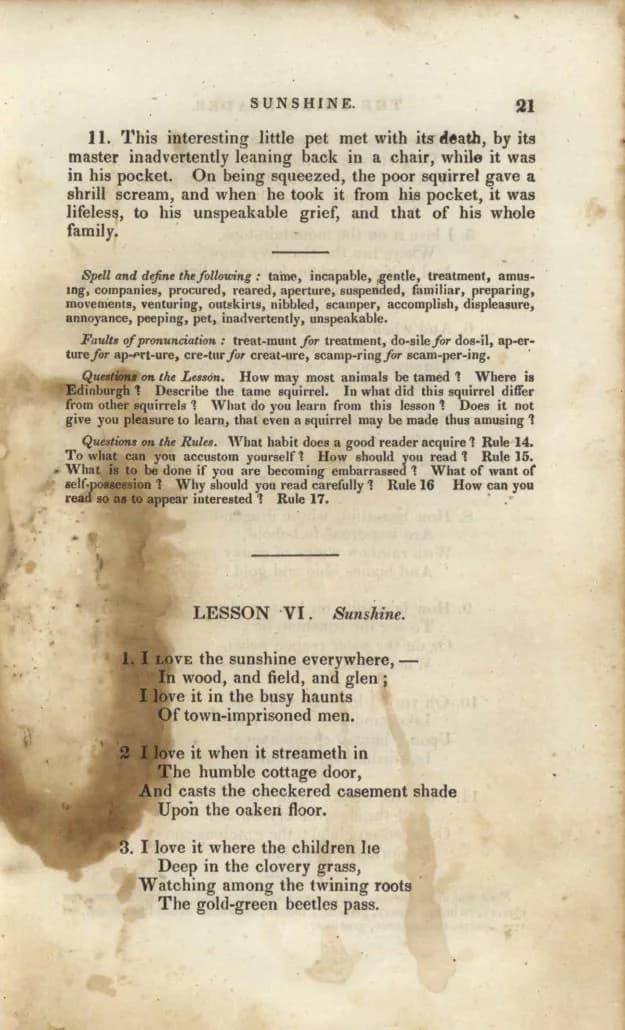
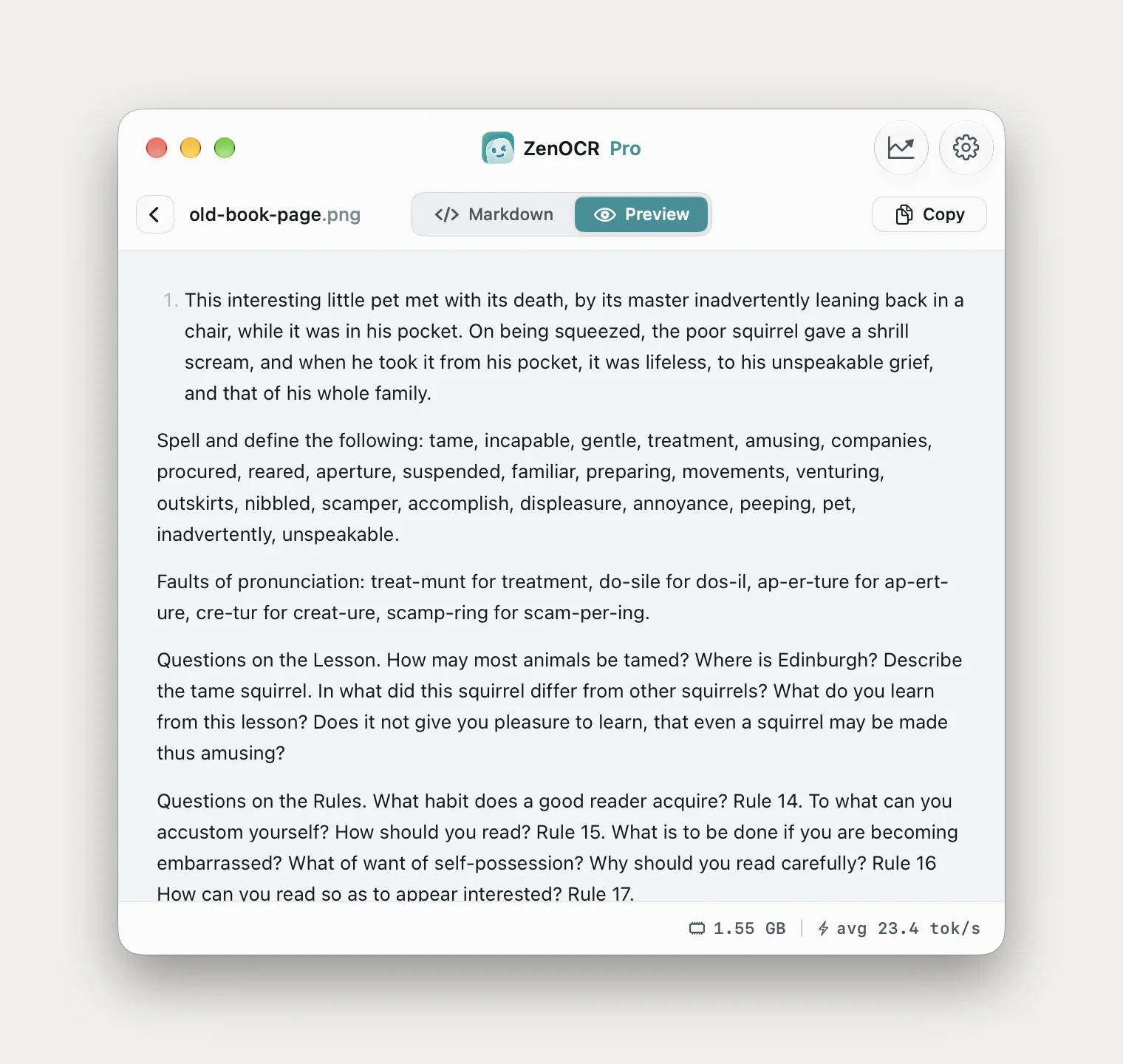
A stained page from an old book
Farlts of pronunciation: treat-munt for treatment, do-sile for dos-il, ap-er-
ture for ap-ert-ure, cre-tur for creat-ure, scamp-ring for scam-per-ing.
To what can you accustom yourself? How should you read 1 Rule 15
What is to be done if you are becoming embarrassed? What of want of
sell-possession 1 Why should you read carefully ?
Three character errors, two question marks became the digit 1, and a word was silently dropped from the spelling list above.
Faults of pronunciation: treat-munt for treatment, do-sile for dos-il, ap-er-ture for ap-ert-ure, cre-tur for creat-ure, scamp-ring for scam-per-ing.

Questions on the Rules. What habit does a good reader acquire? Rule 14. To what can you accustom yourself? How should you read? Rule 15. What is to be done if you are becoming embarrassed? What of want of self-possession? Why should you read carefully?
All three errors fixed and the hyphenation rejoined. It dropped the running head and the page number, which Vision kept.
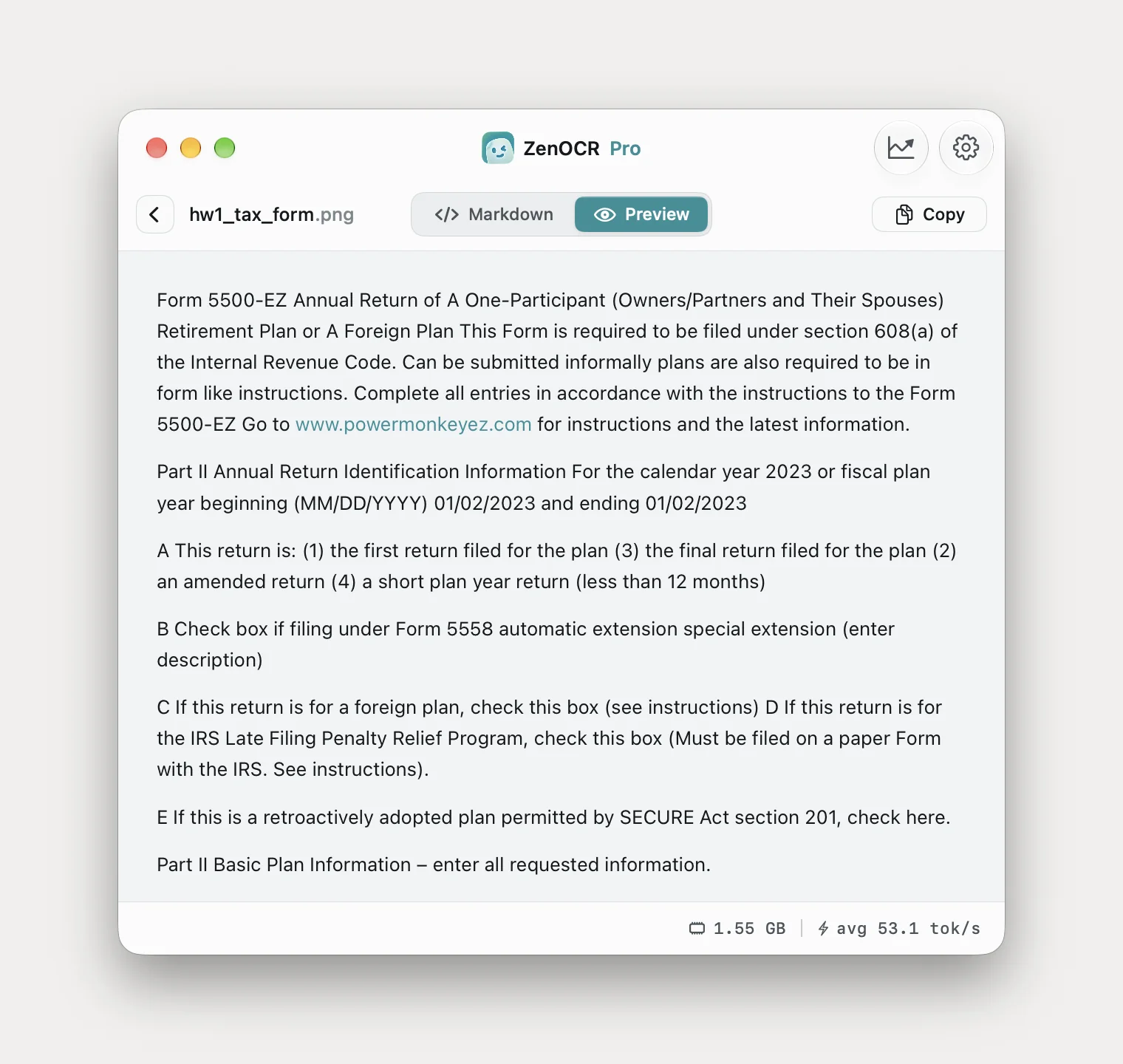
A handwritten form
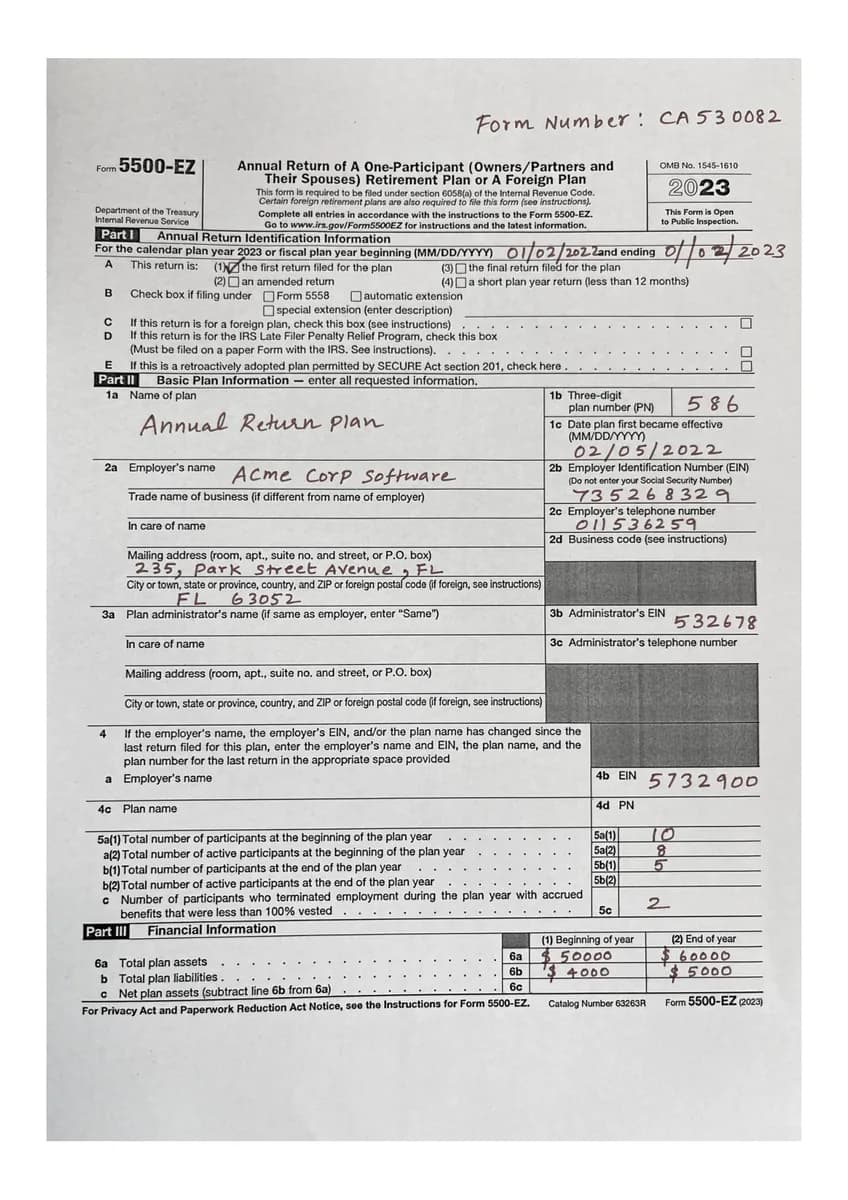
Vision read the printed sentences exactly and returned the handwritten dates detached from their labels, running one into the next as 01/02/202 Zand ending 0/02. GLM-OCR put both plan-year dates with the field they belong to and misread the first year, giving 01/02/2023 where the form says 01/02/2022. The two engines fail on opposite halves of the same problem, and GLM-OCR's half is the one that looks correct. Tesseract rendered the form title as rom 3DOO-EZ.
The general shape
Across everything I ran, Vision degrades on four things and only four: tables, faded or stained paper, awkward old print, and handwriting. Everywhere else it is excellent and free. Full outputs are in the tables article and the scanned PDF article.
The two models are not interchangeable either, and the picker labels are accurate: DeepSeek-OCR-2 produced every clean-document result above, GLM-OCR won on the stained page and the handwriting.
If you are looking for a TextSniper alternative
It depends what you dislike about it.
If it is the price, Shottr is free and does the same capture. If it is the interface, CleanShot X is more app for more money. If it is that TextSniper missed a page and you assume a competitor would have caught it, that is the assumption worth killing: another Vision-based utility misses it in exactly the same place. Switching sideways within the group changes nothing about the text.
The only switch that changes the output is a switch of engine, and there are three on this page: a local vision-language model, ABBYY's engine, or Mathpix's cloud. The first stays on your Mac, the second costs $69 a year, the third requires uploading.
What ZenOCR is not
- No searchable PDF export. OwlOCR and Acrobat do this. ZenOCR outputs text and Markdown and writes nothing back into a PDF.
- Not a PDF editor. No merging, redacting, form filling or signing.
- Not the best screenshot tool. TextSniper and Shottr are faster at hotkey-to-clipboard and one of them is free.
- No Obsidian plugin, no Notion integration. It saves Markdown into a folder, which can sit inside a vault.
- No advantage on clean printed prose. Vision matched it word for word on a scanned contract.
- macOS 14 or later, Apple Silicon for AI mode. Intel Macs get Fast mode, which is Vision, which they already have.
Picking one
| If you want | Use | Cost |
|---|---|---|
| Occasional text out of an image | Live Text, already installed | Free |
| Fast hotkey capture, no budget | Shottr | Free |
| Fast hotkey capture, polished | TextSniper | $9.99 once |
| Screenshots, annotation and recording together | CleanShot X | $29 plus renewals |
| Searchable PDFs | Preview Embed Text, or OwlOCR | Free, or $19.99/yr |
| Scanning workflow with cleanup | Prizmo 5 | $49.99/yr or $99.99 |
| High-volume document conversion | ABBYY FineReader PDF | $69/yr |
| Mathematics, uploading acceptable | Mathpix Snip | $4.99/mo |
| Tables, damaged scans, old print, handwriting, all local | ZenOCR AI mode | $12.99 once |
Prices verified 23 August 2026 from each vendor's own site or App Store listing; check before buying. Naming these products is comparison under nominative fair use, not affiliation, and none of them endorse this.
Related: the full best-of comparison with scenario recommendations, extracting tables from a scan, and handwriting OCR on a Mac. The app is on the ZenOCR homepage.